 Firefox
 1 / 8
1 / 8Loading font…
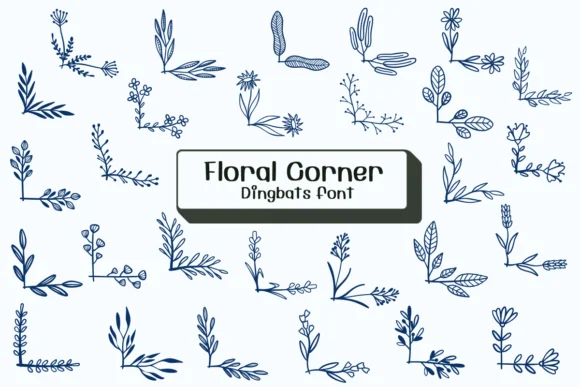
About Floral Corner Font
Floral Corner by Ketsarin showcases hand-drawn botanical corner ornaments with a wonderfully tactile, organic feel that's easy to recognize and appealing to look at. These aren't your standard decorative borders; they're modular corner pieces designed to frame and punctuate other design elements, adding a distinctive charm that sets them apart from generic dingbat collections.
This typeface shines in luxury wedding invitation suites, where the botanical corners can define elegant page frames and add sophistication. For Etsy product labels, boutique skincare packaging, and personalized stationery systems, this font works beautifully where a nature-forward aesthetic feels authentic rather than generic. Sketchy warmth and genuine hand-drawn character shine through every corner piece, distinct from the sterile perfection of factory-made vector graphics. Available in both OTF and TTF formats, the font works across design applications without friction.
Floral Corner is built for designers and crafters who embrace botanical and organic aesthetics in their creative work. Indie makers designing custom packaging, wedding professionals building complete stationery systems, and indie illustrators all find this font immediately useful and versatile. You'll find it ready to use on Creative Fabrica, where you can add it to your collection and integrate it with Procreate, Affinity Designer, and Affinity Photo.
Style & Use Cases
- Overall Style
- Iconographic, Fonts
- Use Case
- Icons, Accents
- Ideal For
- ornaments, bullets, and decorative flourishes
- Pairs With
- any text font
How to Install Floral Corner Font
Step-by-step instructions for every platform
- 1Download the Floral Corner font file (.ttf or .otf).
- 2Locate the downloaded file in your Downloads folder.
- 3Right-click the font file.
- 4Select "Install" to install for the current user, or "Install for all users" to make it available system-wide.
- 5Floral Corner is now available in Word, Photoshop, Illustrator, and all other apps.
More by Ketsarin
View all →
Browse fonts by theme
Curated collections →Saw a font in a picture? Identify any font from an image with our free Font Finder.
More Dingbats Fonts
Browse all →







What pairs well with Floral Corner Font?
Floral Corner Font is a versatile dingbats font that works for both headings and body text. Pair it with a contrasting sans-serif or serif font to add visual interest and a clear distinction between titles and body copy.




Floral Corner Font
by Ketsarin
Reviewed by the FontBoxDL team · Updated October 2026