 Firefox
 1 / 8
1 / 8About Floral Bouquet Font
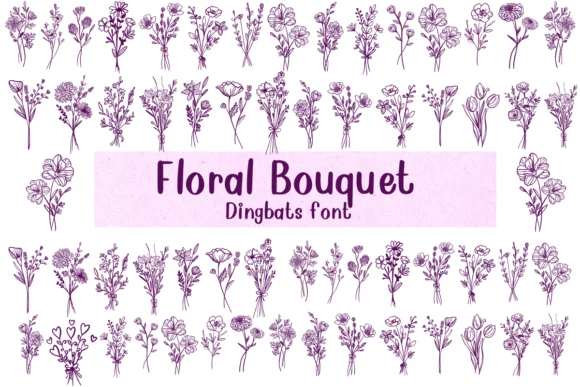
This font brings instant warmth and organic charm to any layout. Floral Bouquet, designed by Nongyao, is a dingbat typeface where each character blooms with hand-drawn botanical details, transforming even simple text into garden-inspired artwork that feels alive and tactile.
The design shines for wedding invitation suites where every detail needs to convey elegance and nature, botanical stationery design that celebrates plant life, scrapbook embellishments that add dimensionality to memory pages, and gift tag lettering on handmade items. Beyond paper, it works well for DIY craft signage and plant-themed branding. The line-art construction comes in both OTF and TTF formats, giving you flexibility: color the outlines yourself during your design process, or layer the vector-based floral elements as-is over photography and watercolor backgrounds. Each letter acts less like type and more like a ready-made illustration element that brings movement and softness to your layouts.
Combine Floral Bouquet with a clean, geometric sans-serif for any body copy or structural text, and watch the florals become powerful accent pieces that guide the eye. The contrast between ornamental and minimal will make both typefaces work harder. Available on Creative Fabrica, this one deserves a spot in any designer's toolkit for projects needing a little botanical magic.
Style & Use Cases
- Overall Style
- Iconographic, Fonts
- Use Case
- Icons, Accents
- Ideal For
- ornaments, bullets, and decorative flourishes
- Pairs With
- any text font
How to Install Floral Bouquet Font
Step-by-step instructions for every platform
- 1Download the Floral Bouquet font file (.ttf or .otf).
- 2Locate the downloaded file in your Downloads folder.
- 3Right-click the font file.
- 4Select "Install" to install for the current user, or "Install for all users" to make it available system-wide.
- 5Floral Bouquet is now available in Word, Photoshop, Illustrator, and all other apps.




Browse fonts by theme
Curated collections →Saw a font in a picture? Identify any font from an image with our free Font Finder.
More Dingbats Fonts
Browse all →







What pairs well with Floral Bouquet Font?
Floral Bouquet Font is a versatile dingbats font that works for both headings and body text. Pair it with a contrasting sans-serif or serif font to add visual interest and a clear distinction between titles and body copy.




Floral Bouquet Font
by Nongyao
Reviewed by the FontBoxDL team · Updated June 2026