 Firefox
 1 / 5
1 / 5About FILM NOUVEAU JNL Font
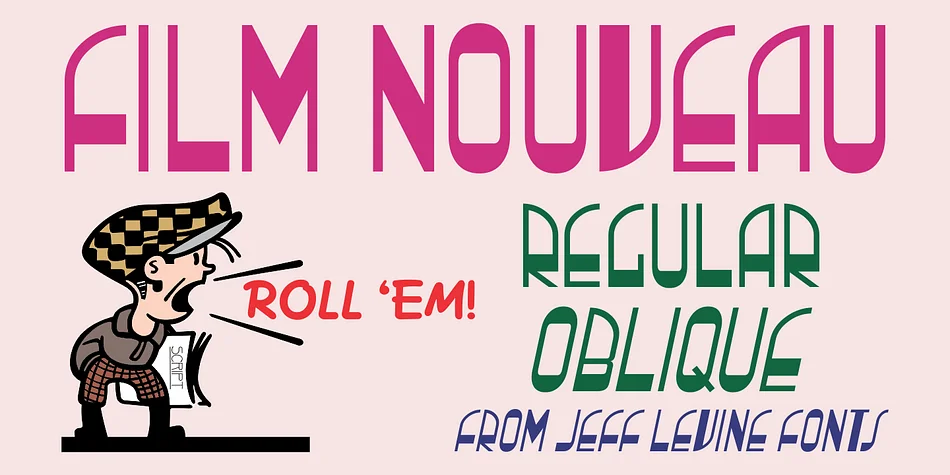
Picture yourself designing a vintage theater poster or a glamorous cabaret program cover. That's where Film Nouveau JNL, created by Jeff Levine Fonts, truly shines. This decorative typeface captures the bold energy of 1930s neon marquee lettering, merging the flowing elegance of Art Nouveau with the geometric sharpness of Art Deco. The result feels authentic to the golden age of cinema without ever feeling forced or anachronistic.
This font excels on cocktail lounge menus, speakeasy event flyers, and retro diner signage where that mid-century glamour matters. Art deco wedding invitations are a natural fit too, as is any branding project drawing from the entertainment heritage of the 1930s and 40s. Its condensed, slightly compressed letterforms give immediate visual impact without sacrificing legibility, even when you push it large for dramatic effect.
Both regular and oblique versions are included, offering the flexibility you need for headlines and distinctive logotypes. Proportions read clearly at substantial sizes, so you can use it with confidence for marquee work and prominent display applications. Get Film Nouveau JNL on Creative Fabrica to bring authentic vintage showbiz flair to your designs.
Style & Use Cases
- Overall Style
- Bold, Distinctive
- Use Case
- Headlines, Posters
- Ideal For
- logos, packaging, and standout titles
- Pairs With
- a neutral sans-serif
How to Install FILM NOUVEAU JNL Font
Step-by-step instructions for every platform
- 1Download the FILM NOUVEAU JNL font file (.ttf or .otf).
- 2Locate the downloaded file in your Downloads folder.
- 3Right-click the font file.
- 4Select "Install" to install for the current user, or "Install for all users" to make it available system-wide.
- 5FILM NOUVEAU JNL is now available in Word, Photoshop, Illustrator, and all other apps.
More by Jeff Levine Fonts
View all →



Browse fonts by theme
Curated collections →Saw a font in a picture? Identify any font from an image with our free Font Finder.
More Decorative Fonts
Browse all →







What pairs well with FILM NOUVEAU JNL Font?
FILM NOUVEAU JNL Font is a decorative font that shines as a display or heading face. Pair it with a clean sans-serif or serif font for body text — the contrast creates a clear hierarchy while the two styles stay balanced and easy to read.




FILM NOUVEAU JNL Font
Reviewed by the FontBoxDL team · Updated June 2026