 Firefox
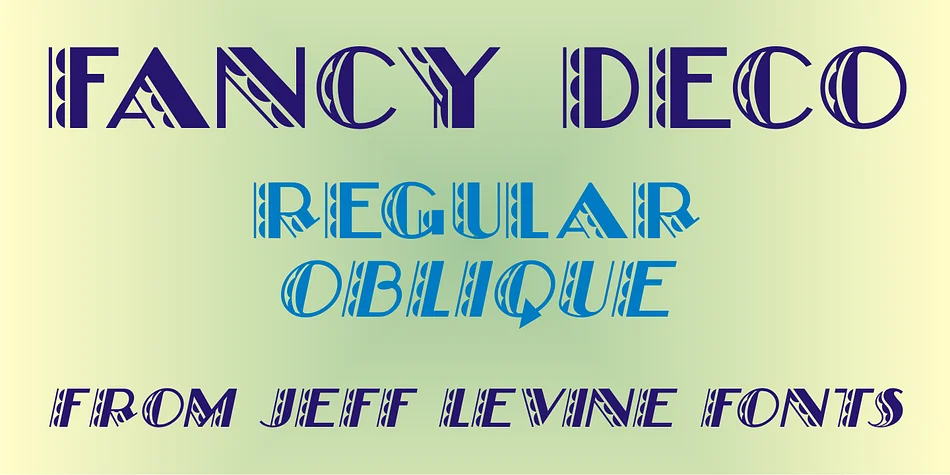
About FANCY DECO JNL Font
This is pure vintage glamour. FANCY DECO JNL, designed by Jeff Levine Fonts, channels the graphic exuberance of 1930s French typography with its scalloped edges and playful thick-and-thin contrasts. The letters have that confident, slightly theatrical quality that defines Art Deco at its best, making every word feel like it belongs on a marquee or gallery wall.
The font shines in specific applications where personality matters more than restraint. Think retro speakeasy menus, vintage liquor labels, luxury beauty packaging with a nostalgic twist, or eye-catching album artwork that needs visual punch. It also works beautifully for anniversary invitations, gallery opening announcements, or vintage-inspired wedding paper suites where you want character rather than convention. Drawn from the precise, elegant traditions of 1930s French lettering, the weight variation means the letterforms remain readable even at smaller sizes, while the scalloped details add visual richness without becoming fussy. The contrast between thick and thin strokes gives it genuine presence on the page.
Pair it with a clean, understated serif or a geometric sans-serif for any body copy or supporting text. That contrast lets the decorative character of FANCY DECO JNL stand out without competing with itself. Find it on Creative Fabrica and give your next project the glamour it deserves.
Style & Use Cases
- Overall Style
- Bold, Distinctive
- Use Case
- Headlines, Posters
- Ideal For
- logos, packaging, and standout titles
- Pairs With
- a neutral sans-serif
How to Install FANCY DECO JNL Font
Step-by-step instructions for every platform
- 1Download the FANCY DECO JNL font file (.ttf or .otf).
- 2Locate the downloaded file in your Downloads folder.
- 3Right-click the font file.
- 4Select "Install" to install for the current user, or "Install for all users" to make it available system-wide.
- 5FANCY DECO JNL is now available in Word, Photoshop, Illustrator, and all other apps.
More by Jeff Levine Fonts
View all →



Browse fonts by theme
Curated collections →Saw a font in a picture? Identify any font from an image with our free Font Finder.
More Decorative Fonts
Browse all →







What pairs well with FANCY DECO JNL Font?
FANCY DECO JNL Font is a decorative font that shines as a display or heading face. Pair it with a clean sans-serif or serif font for body text — the contrast creates a clear hierarchy while the two styles stay balanced and easy to read.




FANCY DECO JNL Font
Reviewed by the FontBoxDL team · Updated June 2026