
 1 / 9
1 / 9About Elvitha Font
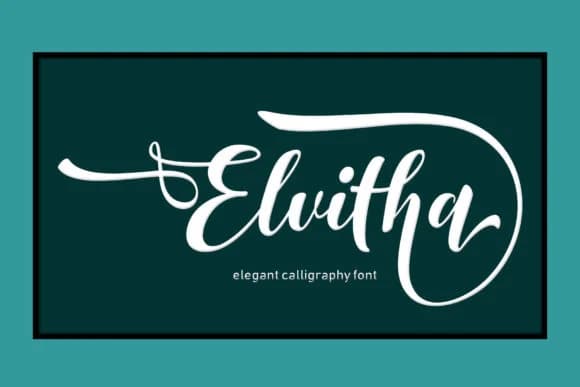
Picture yourself sitting down to hand-letter a beautiful wedding invitation suite, and you realize the right script can make or break the whole mood. Elvitha, from designer Arie Design, is a handwritten script that brings this kind of authentic polish to any craft project where handmade character matters. The swashes are expressive without feeling over the top, so they work just as well on a delicate envelope liner as they do anchoring a standalone greeting card.
You'll find Elvitha fits naturally into projects where that personal touch is the whole point: save-the-date cards, boutique packaging labels, DIY craft signage, and those hand-drawn product tags you'd see on an Etsy shop. This script sits in that sweet spot between flowing and legible, so it reads clearly even when you scale it up for visual impact. What makes it especially useful is the swashes, which give you built-in visual hierarchy, letting you emphasize key words or phrases without needing a second font to land the important moments.
The font holds up beautifully at large sizes without losing legibility or character. You can find Elvitha on Creative Fabrica, ready to add that authentic handwritten touch to any design calling for genuine character.
Style & Use Cases
- Overall Style
- Elegant, Flowing, Elvitha Script
- Use Case
- Invitations, Branding
- Ideal For
- wedding stationery, greeting cards, and signatures
- Pairs With
- a simple uppercase sans
How to Install Elvitha Font Font
Step-by-step instructions for every platform
- 1Download the Elvitha Font font file (.ttf or .otf).
- 2Locate the downloaded file in your Downloads folder.
- 3Right-click the font file.
- 4Select "Install" to install for the current user, or "Install for all users" to make it available system-wide.
- 5Elvitha Font is now available in Word, Photoshop, Illustrator, and all other apps.
More by Arie Design
View all →
More Script Handwritten Fonts
Browse all →







What pairs well with Elvitha Font?
Elvitha Font is a script font that shines as a display or heading face. Pair it with a clean sans-serif or serif font for body text — the contrast creates a clear hierarchy while the two styles stay balanced and easy to read.



Elvitha Font
by Arie Design
Reviewed by the FontBoxDL team · Updated August 2026