
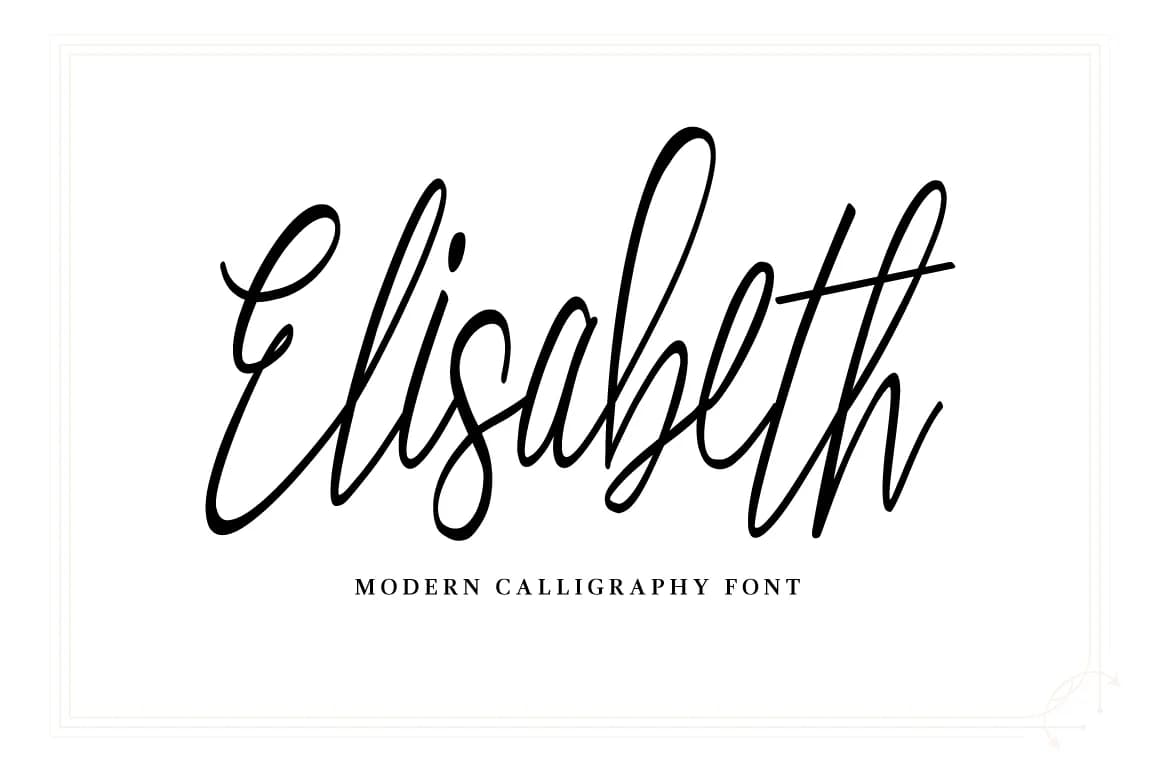
 1 / 5
1 / 5About Elisabeth Font
Elisabeth Font by designtreasuree is a playful handwritten script that captures the charm of casual, improvised letterforms while maintaining excellent readability. The typeface brings movement and personality to text, creating the kind of authentic presence that distinguishes custom work from templated designs. Its bouncy rhythm and natural baseline variations give projects an immediately friendly, approachable feel without sacrificing polish or professionalism. This script shines in applications where personality matters, custom greeting cards that feel genuinely personal, boutique product packaging that demands handmade character, event invitations with informal elegance, and small-business stationery that reflects authentic brand identity. The lively letterforms work equally well in digital spaces, adding warmth to social media graphics and lifestyle content where genuine authenticity resonates with audiences. Elisabeth's versatility across print and screen makes it valuable for creators seeking a single font that performs across multiple touchpoints. The dynamic strokes prove particularly useful when text spans multiple lines, a strength not all handwritten scripts possess. Whether you're designing birthday announcements, crafting brand identity for a creative business, building packaging systems for handmade goods, or adding personality to website headers, Elisabeth delivers consistent character and charm. Its natural rhythm supports both headline applications and surprising versatility in body-text scenarios for brands embracing a more personal aesthetic. Add Elisabeth Font to your creative toolkit on Creative Fabrica today.
Style & Use Cases
- Overall Style
- Elegant, Flowing, Elisabeth
- Use Case
- Invitations, Branding
- Ideal For
- wedding stationery, greeting cards, and signatures
- Pairs With
- a simple uppercase sans
How to Install Elisabeth Font Font
Step-by-step instructions for every platform
- 1Download the Elisabeth Font font file (.ttf or .otf).
- 2Locate the downloaded file in your Downloads folder.
- 3Right-click the font file.
- 4Select "Install" to install for the current user, or "Install for all users" to make it available system-wide.
- 5Elisabeth Font is now available in Word, Photoshop, Illustrator, and all other apps.
More by designtreasuree
View all →
More Script Handwritten Fonts
Browse all →







What pairs well with Elisabeth Font?
Elisabeth Font is a script font that shines as a display or heading face. Pair it with a clean sans-serif or serif font for body text — the contrast creates a clear hierarchy while the two styles stay balanced and easy to read.



Elisabeth Font
Reviewed by the FontBoxDL team · Updated May 2026