
 1 / 8
1 / 8About Edelweiss Font
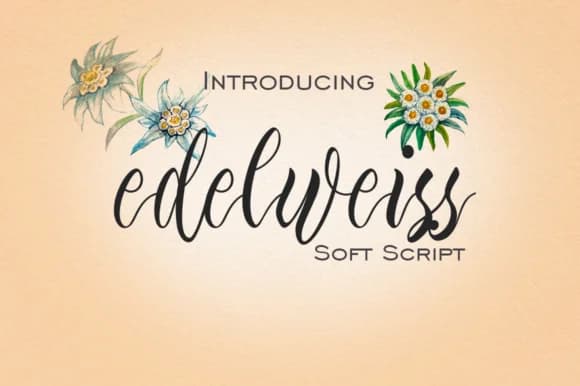
Edelweiss Font by mcjer.studio is a flowing calligraphic script that captures the delicate elegance of its namesake alpine flower. With its graceful curves and authentic hand-lettered character, this typeface brings an artisanal quality to design work that demands refined sophistication and visual warmth. The extensive glyph collection ensures designers have comprehensive character support for complex layouts, multilingual projects, and intricate typographic compositions that require both versatility and aesthetic consistency. Each letterform displays careful attention to detail, making this script equally at home in traditional print work or contemporary digital applications.
This script thrives in premium design contexts where elegance and storytelling merge seamlessly. Wedding invitation suites gain romantic botanical appeal from its refined letterforms, while luxury brand packaging speaks eloquently to discerning consumers through its distinguished presence and visual weight. Social media graphics for lifestyle and wellness brands, high-end restaurant menus, wine labels, and boutique beauty product packaging all benefit from Edelweiss's graceful sensibility and readability. Literary fiction book covers, lifestyle magazines, luxury stationery designs, and specialty packaging projects further showcase its remarkable ability to convey sophistication and emotion through carefully crafted letterforms.
Explore how Edelweiss Font transforms your design vocabulary by adding it to your Creative Fabrica library today.
How to Install Edelweiss Font Font
Step-by-step instructions for every platform
- 1Download the Edelweiss Font font file (.ttf or .otf).
- 2Locate the downloaded file in your Downloads folder.
- 3Right-click the font file.
- 4Select "Install" to install for the current user, or "Install for all users" to make it available system-wide.
- 5Edelweiss Font is now available in Word, Photoshop, Illustrator, and all other apps.
More by mcjer.studio
View all →
More Script Handwritten Fonts
Browse all →







What pairs well with Edelweiss Font?
Edelweiss Font is a script font that shines as a display or heading face. Pair it with a clean sans-serif or serif font for body text — the contrast creates a clear hierarchy while the two styles stay balanced and easy to read.


