 Firefox
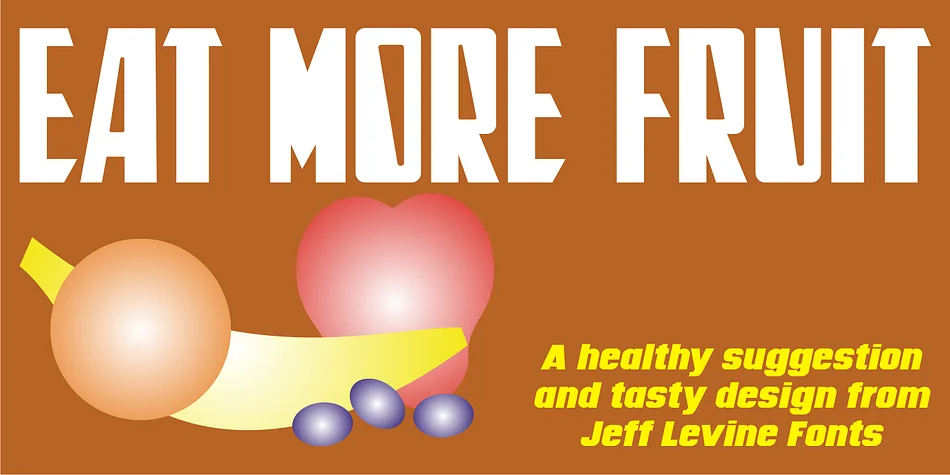
About EAT MORE FRUIT JNL Font
This typeface radiates playful defiance and vintage charisma from every letter. EAT MORE FRUIT JNL by Jeff Levine Fonts captures the unbridled energy of competing design eras by skillfully melding the geometric precision and clean lines of 1940s Art Deco sensibilities with the irreverent, carefree spirit of 1960s and 70s underground concert poster typography. The combination creates something genuinely distinctive, a typeface that feels nostalgic yet somehow timeless, grounded in history yet rebelliously modern.
The letterforms shine when tackling vintage event posters, retro snack and candy packaging labels, groovy concert and music promotional materials, and psychedelic-themed party invitations. You could also use it for vintage deli menus or retro record store signage. Each glyph carries that signature slightly off-kilter tilt that makes the font instantly memorable and visually arresting without ever sacrificing readability. This is letterwork that demands attention while remaining genuinely functional at a range of sizes.
To let this typeface's bold personality remain the clear focal point of your design, pair it with a clean, no-nonsense sans-serif for any body text or supporting information. This contrast keeps the design from feeling chaotic while letting the font do what it does best. EAT MORE FRUIT JNL is available on Creative Fabrica, ready to inject genuine retro character into any design that's hungry for it.
Style & Use Cases
- Overall Style
- Bold, Distinctive
- Use Case
- Headlines, Posters
- Ideal For
- logos, packaging, and standout titles
- Pairs With
- a neutral sans-serif
How to Install EAT MORE FRUIT JNL Font
Step-by-step instructions for every platform
- 1Download the EAT MORE FRUIT JNL font file (.ttf or .otf).
- 2Locate the downloaded file in your Downloads folder.
- 3Right-click the font file.
- 4Select "Install" to install for the current user, or "Install for all users" to make it available system-wide.
- 5EAT MORE FRUIT JNL is now available in Word, Photoshop, Illustrator, and all other apps.
More by Jeff Levine Fonts
View all →



Browse fonts by theme
Curated collections →Saw a font in a picture? Identify any font from an image with our free Font Finder.
More Decorative Fonts
Browse all →







What pairs well with EAT MORE FRUIT JNL Font?
EAT MORE FRUIT JNL Font is a decorative font that shines as a display or heading face. Pair it with a clean sans-serif or serif font for body text — the contrast creates a clear hierarchy while the two styles stay balanced and easy to read.




EAT MORE FRUIT JNL Font
Reviewed by the FontBoxDL team · Updated June 2026