 Firefox
 1 / 9
1 / 9About Dyowesh Font
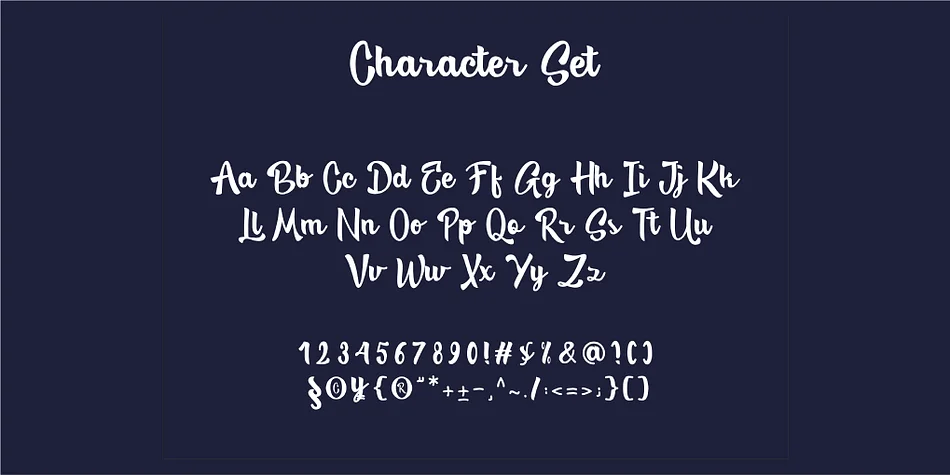
Dyowesh, designed by Intan Meisy, is a bold handwritten script that brings genuine character to designs without feeling trendy or disposable. The letterforms combine flowing curves with sturdy geometric weight in the initials, making each character feel intentional and built to last. This is a script that works because it has restraint; it reads well in layouts rather than competing for attention, and it pairs surprisingly well with both ornate and minimal design systems. The handwritten quality remains approachable and human.
The font shines on wedding invitation suites, where it keeps handwritten quality legible at smaller print sizes without needing extra formatting. You'll find it particularly strong for Etsy product labels, especially for artisanal goods and small-batch packaging where the authenticity of a hand-drawn feel matters to your brand. It translates well to boutique cosmetics and skincare packaging, DIY vinyl cutting projects, and custom brand stamp designs. Works beautifully for monogram designs and logo applications where you need personality and visual distinction without chaos.
Dyowesh works best for designers and small business owners who want their work to feel handcrafted without looking amateur or unpolished. If you're building a brand identity that values character over trendy perfection, this is your script. You can find it on Creative Fabrica.
Style & Use Cases
- Overall Style
- Elegant, Flowing
- Use Case
- Invitations, Branding
- Ideal For
- wedding stationery, greeting cards, and signatures
- Pairs With
- a simple uppercase sans
How to Install Dyowesh Font
Step-by-step instructions for every platform
- 1Download the Dyowesh font file (.ttf or .otf).
- 2Locate the downloaded file in your Downloads folder.
- 3Right-click the font file.
- 4Select "Install" to install for the current user, or "Install for all users" to make it available system-wide.
- 5Dyowesh is now available in Word, Photoshop, Illustrator, and all other apps.
More by Intan Meisy
View all →
Browse fonts by theme
Curated collections →Saw a font in a picture? Identify any font from an image with our free Font Finder.
More Script Handwritten Fonts
Browse all →







What pairs well with Dyowesh Font?
Dyowesh Font is a script font that shines as a display or heading face. Pair it with a clean sans-serif or serif font for body text — the contrast creates a clear hierarchy while the two styles stay balanced and easy to read.




Dyowesh Font
by Intan Meisy
Reviewed by the FontBoxDL team · Updated July 2026