 Firefox
About DREAMY JNL Font
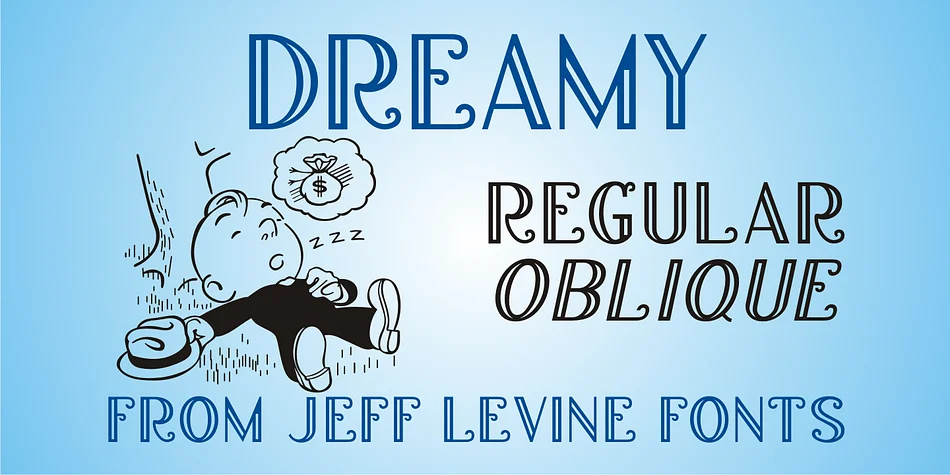
DREAMY JNL by Jeff Levine Fonts captures the refined glamour of 1920s Art Deco with a typeface rooted in genuine period design. The letterforms derive from ornamental hand-lettering on a Jerome Kern song cover, complete with delicate engraved lines that give every character a sense of depth and sophistication. You get both upright and italic cuts, and both maintain that incised detail work, making them equally striking whether you're working at headline scale or managing smaller body text. The way the letters sit reveals real craftsmanship, elegant without becoming fussy or overwrought.
This is your font when designing vintage-inspired wedding invitations, luxury cosmetics packaging, or speakeasy-style event graphics. Consider it for boutique perfume labels, hand-lettered stationery suites, craft book covers, or the packaging for artisanal chocolates and specialty goods. The typeface lands somewhere between nostalgic and timeless rather than drifting into parody or kitsch, which is precisely why it works across so many projects. Many designers pair it with sturdy serif companions for longer passages of text, though the decorative weight performs beautifully on its own for headlines and shorter bursts of copy. The versatility comes from restraint: nothing about DREAMY JNL shouts, yet everything commands attention.
Head over to Creative Fabrica to download it and bring a touch of 1920s elegance to your next project.
Style & Use Cases
- Overall Style
- Bold, Distinctive
- Use Case
- Headlines, Posters
- Ideal For
- logos, packaging, and standout titles
- Pairs With
- a neutral sans-serif
How to Install DREAMY JNL Font
Step-by-step instructions for every platform
- 1Download the DREAMY JNL font file (.ttf or .otf).
- 2Locate the downloaded file in your Downloads folder.
- 3Right-click the font file.
- 4Select "Install" to install for the current user, or "Install for all users" to make it available system-wide.
- 5DREAMY JNL is now available in Word, Photoshop, Illustrator, and all other apps.
More by Jeff Levine Fonts
View all →



Browse fonts by theme
Curated collections →Saw a font in a picture? Identify any font from an image with our free Font Finder.
More Decorative Fonts
Browse all →







What pairs well with DREAMY JNL Font?
DREAMY JNL Font is a decorative font that shines as a display or heading face. Pair it with a clean sans-serif or serif font for body text — the contrast creates a clear hierarchy while the two styles stay balanced and easy to read.




DREAMY JNL Font
Reviewed by the FontBoxDL team · Updated June 2026