 Firefox
 1 / 8
1 / 8About Dreaming Tree Font
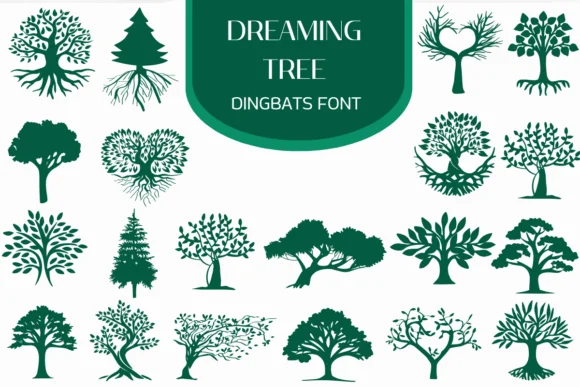
You're laying out a custom leather journal and need decorative symbols that feel hand-drawn. Dreaming Tree, designed by Heartcraft Atelier, is a dingbat font built from whimsical forest illustrations. Each keystroke produces a different element: branching trees, flowering blossoms, floating leaves, and enchanted woodland scenes. The linework feels sketched rather than polished, which matters when your design needs to feel personal and organic instead of corporate.
This dingbat collection is built for illustrated journaling spreads, botanical scrapbooking layouts, and custom greeting card suites. Stationery makers and DIY craft creators use it to populate decorative labels, printed envelope liners, and children's coloring pages without reaching for generic stock graphics. The beauty of using a dingbat font instead of clipart is speed: you build your forest one keypress at a time, layer by layer, and the cohesion comes automatically because every element shares the same hand-drawn voice.
The font includes both outline and coloring versions, letting you sketch the trees with one version and fill them with another. Offered in both OTF and TTF, it plays nicely with Procreate, Affinity Designer, and most other professional design software. Grab it on Creative Fabrica and you'll find yourself reaching for it constantly on any woodland-themed design project.
Style & Use Cases
- Overall Style
- Iconographic, Fonts
- Use Case
- Icons, Accents
- Ideal For
- ornaments, bullets, and decorative flourishes
- Pairs With
- any text font
How to Install Dreaming Tree Font
Step-by-step instructions for every platform
- 1Download the Dreaming Tree font file (.ttf or .otf).
- 2Locate the downloaded file in your Downloads folder.
- 3Right-click the font file.
- 4Select "Install" to install for the current user, or "Install for all users" to make it available system-wide.
- 5Dreaming Tree is now available in Word, Photoshop, Illustrator, and all other apps.
More by Heartcraft Atelier
View all →
Browse fonts by theme
Curated collections →Saw a font in a picture? Identify any font from an image with our free Font Finder.
More Dingbats Fonts
Browse all →






What pairs well with Dreaming Tree Font?
Dreaming Tree Font is a versatile dingbats font that works for both headings and body text. Pair it with a contrasting sans-serif or serif font to add visual interest and a clear distinction between titles and body copy.




Dreaming Tree Font
Reviewed by the FontBoxDL team · Updated June 2026