
 1 / 9
1 / 9About Dreamdelion Font
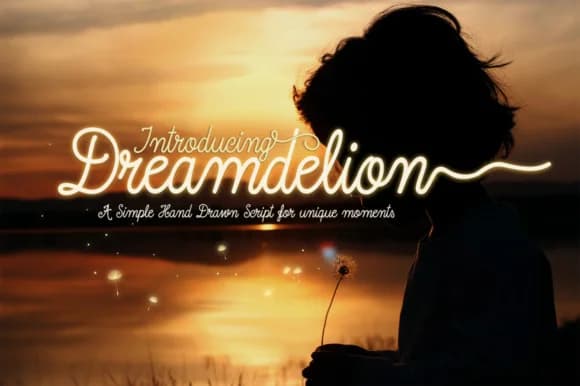
Dreamdelion Font by BMACHINA Laboratories is a whimsical monoline script that captures the delicate, wind-scattered elegance of its namesake. This handwritten-style typeface conveys romantic nostalgia through irregular letterforms that feel intimate and personal, evoking a sense of gentle movement and timeless charm reminiscent of vintage correspondence.
The font's natural character makes it exceptionally well-suited for wedding stationery suites, custom greeting card designs, artisan product labels, and hand-lettered social media graphics that demand authenticity. Its flowing swashes add visual interest and sophistication without overwhelming the composition, giving designers flexibility to create beautiful vintage-inspired layouts. The monoline structure keeps all letterforms clean and readable while maintaining that charming, personal touch that draws audiences to handwritten fonts.
Beyond traditional print applications, Dreamdelion works beautifully in both display settings and smaller sizes, making it remarkably versatile for invitation calligraphy, hand-drawn journal covers, boutique branding projects, and storybook illustrations. The font's irregular rhythm and swash details bring personality and genuine warmth to any creative endeavor, whether you're designing packaging for independent makers, creating vintage-style social media templates, or developing complete brand identities for artisanal businesses. This script effortlessly evokes nostalgia while remaining fresh and contemporary for modern design sensibilities.
Discover Dreamdelion Font on Creative Fabrica and bring its whimsical character and romantic appeal to your next creative project.
How to Install Dreamdelion Font Font
Step-by-step instructions for every platform
- 1Download the Dreamdelion Font font file (.ttf or .otf).
- 2Locate the downloaded file in your Downloads folder.
- 3Right-click the font file.
- 4Select "Install" to install for the current user, or "Install for all users" to make it available system-wide.
- 5Dreamdelion Font is now available in Word, Photoshop, Illustrator, and all other apps.
More Script Handwritten Fonts
Browse all →







What pairs well with Dreamdelion Font?
Dreamdelion Font is a script font that shines as a display or heading face. Pair it with a clean sans-serif or serif font for body text — the contrast creates a clear hierarchy while the two styles stay balanced and easy to read.


