 Firefox
 1 / 8
1 / 8Loading font…
About Dragonfly Font
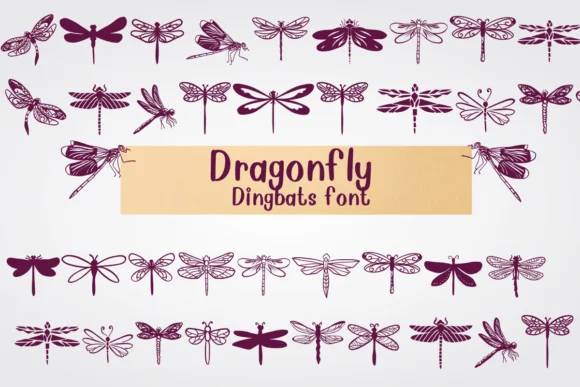
Dragonfly by Nongyao is a hand-drawn dingbat font that swaps out letters and numbers for insect illustrations and creature doodles in place of standard characters. You get dragonflies, beetles, butterflies, and other bugs rendered in a playful, sketchy cartoon style that's genuinely made for coloring. The line-weight construction throughout gives the whole set that organic DIY aesthetic that feels refreshingly honest compared to digital icon fonts. There's real personality baked into every single glyph.
This kind of icon font shines when you're building planner spreads and decorative sticker sheets, where these creatures add whimsy to monthly layouts without competing for attention. Kids' coloring worksheets absolutely benefit from the outline format, giving young artists plenty of breathing room to fill in colors and add their own details. Greeting cards designed with these charming bugs feel noticeably more personal than stock imagery, and scrapbooking layouts become instantly more playful when you layer these elements throughout the composition. If you're creating hand-lettered signage or craft projects with a casual, friendly tone, the doodle style fits the vibe perfectly. The hand-sketched quality gives your finished work an authenticity that feels genuinely crafted rather than templated or mass-produced.
Get Dragonfly on Creative Fabrica to start incorporating these delightful insect illustrations into your next creative project.
Style & Use Cases
- Overall Style
- Iconographic, Fonts
- Use Case
- Icons, Accents
- Ideal For
- ornaments, bullets, and decorative flourishes
- Pairs With
- any text font
How to Install Dragonfly Font
Step-by-step instructions for every platform
- 1Download the Dragonfly font file (.ttf or .otf).
- 2Locate the downloaded file in your Downloads folder.
- 3Right-click the font file.
- 4Select "Install" to install for the current user, or "Install for all users" to make it available system-wide.
- 5Dragonfly is now available in Word, Photoshop, Illustrator, and all other apps.




Browse fonts by theme
Curated collections →Saw a font in a picture? Identify any font from an image with our free Font Finder.
More Dingbats Fonts
Browse all →







What pairs well with Dragonfly Font?
Dragonfly Font is a versatile dingbats font that works for both headings and body text. Pair it with a contrasting sans-serif or serif font to add visual interest and a clear distinction between titles and body copy.




Dragonfly Font
by Nongyao
Reviewed by the FontBoxDL team · Updated October 2026