 Firefox
 1 / 8
1 / 8About Dragon Silhouette Set Font
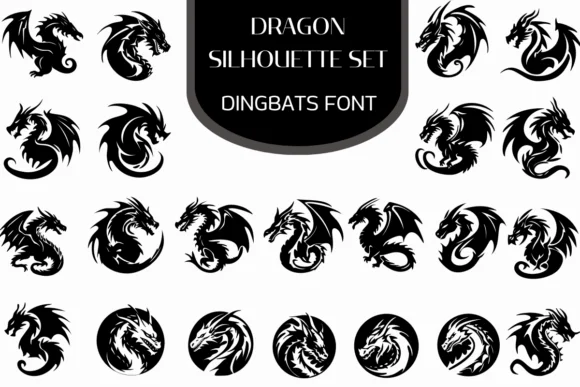
Dragon Silhouette Set from Heartcraft Atelier is a curated collection of dragon icons shaped as a working typeface, giving you quick access to dozens of distinct silhouettes without hunting for vector files. The font contains classic Western winged dragons alongside tribal-inspired serpents and circular emblem designs, each rendered with crisp line work that holds up at any scale.
Use it for indie fantasy book layouts where you need decorative chapter breaks, tabletop RPG character sheets and campaign maps that need authentic dragon imagery, or custom leather branding pieces where a vinyl cutter or laser engraver demands clean, readable paths. Game developers working on dungeon crawler interfaces will find the variety covers everything from fierce winged creatures to coiled serpent forms. Both OTF and TTF formats are included, and the font loads into Procreate, Affinity Photo, and standard design software without a hitch.
Pair a silhouette with a serif font or a hand-drawn medieval display typeface to push the epic feel even further. This collection works best for fantasy creators, indie game designers, and anyone doing custom apparel or signage that needs mythical creature imagery. You'll find Dragon Silhouette Set on Creative Fabrica, ready to type when you need silhouettes fast.
Style & Use Cases
- Overall Style
- Iconographic, Fonts
- Use Case
- Icons, Accents
- Ideal For
- ornaments, bullets, and decorative flourishes
- Pairs With
- any text font
How to Install Dragon Silhouette Set Font
Step-by-step instructions for every platform
- 1Download the Dragon Silhouette Set font file (.ttf or .otf).
- 2Locate the downloaded file in your Downloads folder.
- 3Right-click the font file.
- 4Select "Install" to install for the current user, or "Install for all users" to make it available system-wide.
- 5Dragon Silhouette Set is now available in Word, Photoshop, Illustrator, and all other apps.
More by Heartcraft Atelier
View all →



Browse fonts by theme
Curated collections →Saw a font in a picture? Identify any font from an image with our free Font Finder.
More Dingbats Fonts
Browse all →







What pairs well with Dragon Silhouette Set Font?
Dragon Silhouette Set Font is a versatile dingbats font that works for both headings and body text. Pair it with a contrasting sans-serif or serif font to add visual interest and a clear distinction between titles and body copy.




Dragon Silhouette Set Font
Reviewed by the FontBoxDL team · Updated June 2026