 Firefox
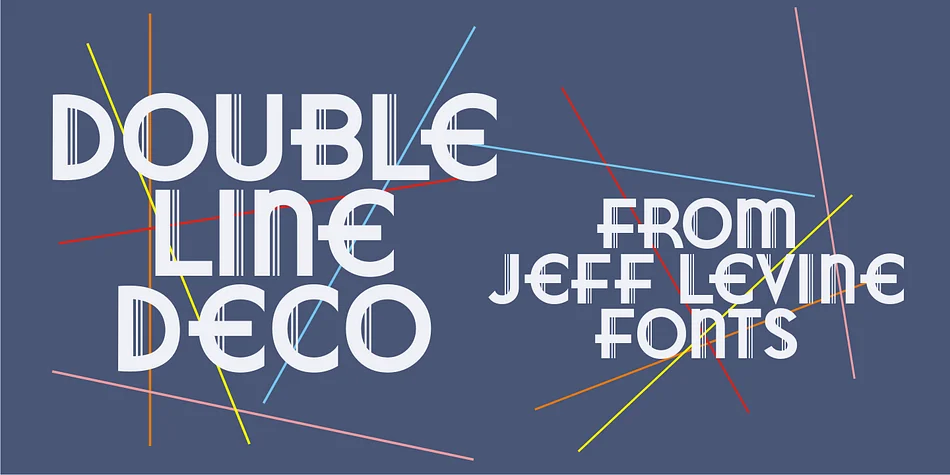
About DOUBLE LINE DECO JNL Font
This typeface captures pure Art Deco sophistication. Double Line Deco JNL by Jeff Levine Fonts is a hand lettered design where each letter is defined by dual parallel vertical lines, creating an elegant geometric rhythm throughout the alphabet.
The double-line construction gives it a distinctive look that works beautifully for vintage-inspired wedding invitation suites, 1920s speakeasy and cocktail event posters, luxury cosmetics and perfume packaging, and decorative Art Deco pattern borders and frames for special projects. The hand lettered quality preserves warmth and character that purely geometric fonts often lose, while the symmetrical double lines keep everything polished and carefully structured. Every letter feels deliberate and crafted, balancing the organic touch of handwriting with geometric precision. There's real sophistication in how the lines frame each character without becoming heavy or overdone.
Because this is a statement typeface, it needs breathing room in your layout. For supporting text or complementary information, pair it with a clean, understated sans-serif like Futura or a simple geometric sans to let the design sing without overwhelming the page. The contrast between DOUBLE LINE DECO JNL's ornamental presence and a minimal supporting font creates visual hierarchy and lets both types work together. You'll find this font on Creative Fabrica, ready to bring that touch of golden age glamour to your next project.
Style & Use Cases
- Overall Style
- Bold, Distinctive
- Use Case
- Headlines, Posters
- Ideal For
- logos, packaging, and standout titles
- Pairs With
- a neutral sans-serif
How to Install DOUBLE LINE DECO JNL Font
Step-by-step instructions for every platform
- 1Download the DOUBLE LINE DECO JNL font file (.ttf or .otf).
- 2Locate the downloaded file in your Downloads folder.
- 3Right-click the font file.
- 4Select "Install" to install for the current user, or "Install for all users" to make it available system-wide.
- 5DOUBLE LINE DECO JNL is now available in Word, Photoshop, Illustrator, and all other apps.
More by Jeff Levine Fonts
View all →



Browse fonts by theme
Curated collections →Saw a font in a picture? Identify any font from an image with our free Font Finder.
More Decorative Fonts
Browse all →







What pairs well with DOUBLE LINE DECO JNL Font?
DOUBLE LINE DECO JNL Font is a decorative font that shines as a display or heading face. Pair it with a clean sans-serif or serif font for body text — the contrast creates a clear hierarchy while the two styles stay balanced and easy to read.




DOUBLE LINE DECO JNL Font
Reviewed by the FontBoxDL team · Updated June 2026