 Firefox
 1 / 8
1 / 8Loading font…
About Doodle Lines Arrows Font
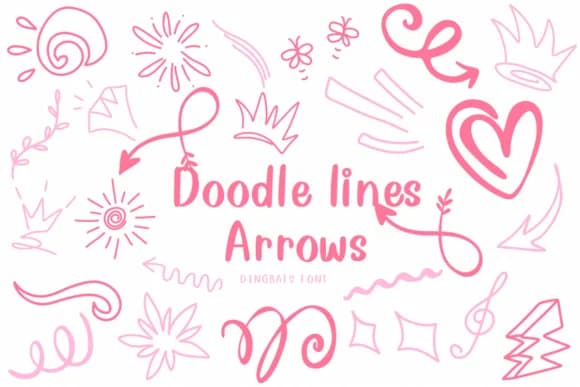
Hand-sketched lines that feel drawn with a pen rather than rendered by a computer form the foundation of Doodle Lines Arrows, a dingbat font by CHANOK. The collection includes arrows pointing in multiple directions, playful symbols, curves, and flowing line work that reads as organic and intentional. Unlike perfectly geometric symbols, each stroke carries the energy of sketching. You get the spontaneity of hand drawing without sacrificing clarity or usability.
This typeface shines in projects that benefit from a sketch-like, approachable aesthetic: greeting card layouts, hand-drawn sticker sheets, notebook and planner decorations, or children's book spot illustrations. Designers also reach for it when creating interactive button sets and navigation icons in web and app designs, where the doodle arrows signal direction in an inviting, human way. The outlined, minimalist approach means it works equally well as a background texture or as a primary design element, depending on how you layer it with other type or imagery.
Doodle Lines Arrows suits anyone making work that needs personality without the polish of a corporate font. Its hand-drawn quality works across formats, from print projects to digital interfaces. Get it on Creative Fabrica and bring sketched flair to your next design.
Style & Use Cases
- Overall Style
- Iconographic, Arrow Symbol
- Use Case
- Icons, Accents
- Ideal For
- ornaments, bullets, and decorative flourishes
- Pairs With
- any text font
How to Install Doodle Lines Arrows Font
Step-by-step instructions for every platform
- 1Download the Doodle Lines Arrows font file (.ttf or .otf).
- 2Locate the downloaded file in your Downloads folder.
- 3Right-click the font file.
- 4Select "Install" to install for the current user, or "Install for all users" to make it available system-wide.
- 5Doodle Lines Arrows is now available in Word, Photoshop, Illustrator, and all other apps.
More by CHANOK
View all →
Browse fonts by theme
Curated collections →Saw a font in a picture? Identify any font from an image with our free Font Finder.
More Dingbats Fonts
Browse all →







What pairs well with Doodle Lines Arrows Font?
Doodle Lines Arrows Font is a versatile dingbats font that works for both headings and body text. Pair it with a contrasting sans-serif or serif font to add visual interest and a clear distinction between titles and body copy.



Doodle Lines Arrows Font
by CHANOK
Reviewed by the FontBoxDL team · Updated October 2026