 Firefox
 1 / 8
1 / 8Loading font…
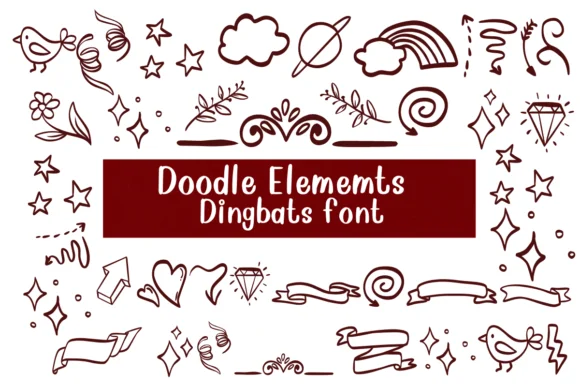
About Doodle Elements Font
When you're laying out a wedding invitation suite or designing custom stickers for an Etsy shop, you need decorative elements that feel sketched by hand rather than pulled from a generic library. Doodle Elements by Nongyao is built for exactly that: a dingbats font overflowing with sketch-style illustrations including birds, abstract arrows, ornamental flourishes, and scattered decorative marks. Both OTF and TTF formats ship with the package, ensuring compatibility across Procreate, Affinity Designer, Affinity Photo, and other industry-standard design software.
This font truly shines in applications that value warmth and personality over slick perfection. Use it for Etsy product labels and packaging designs where a hand-drawn aesthetic differentiates your work from competitors, or for greeting cards and DIY signage that needs visual interest without veering into overly formal territory. Those sketched outlines also work beautifully as templates for coloring illustrations or hand-traced artwork in other mediums. Since these are symbol characters rather than letterforms, you can layer and arrange them freely without the usual concerns around kerning or baseline alignment.
You'll find plenty of variety within this collection for different projects and moods. Pull Doodle Elements into Creative Fabrica to start building richer, more distinctive work.
Style & Use Cases
- Overall Style
- Iconographic, Fonts
- Use Case
- Icons, Accents
- Ideal For
- ornaments, bullets, and decorative flourishes
- Pairs With
- any text font
How to Install Doodle Elements Font
Step-by-step instructions for every platform
- 1Download the Doodle Elements font file (.ttf or .otf).
- 2Locate the downloaded file in your Downloads folder.
- 3Right-click the font file.
- 4Select "Install" to install for the current user, or "Install for all users" to make it available system-wide.
- 5Doodle Elements is now available in Word, Photoshop, Illustrator, and all other apps.

Browse fonts by theme
Curated collections →Saw a font in a picture? Identify any font from an image with our free Font Finder.
More Dingbats Fonts
Browse all →






What pairs well with Doodle Elements Font?
Doodle Elements Font is a versatile dingbats font that works for both headings and body text. Pair it with a contrasting sans-serif or serif font to add visual interest and a clear distinction between titles and body copy.




Doodle Elements Font
by Nongyao
Reviewed by the FontBoxDL team · Updated October 2026