 Firefox
 1 / 8
1 / 8About Doodle Arrow Font
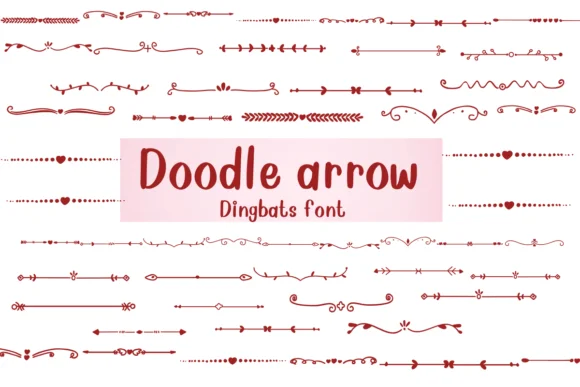
Imagine laying out a bullet journal spread or scrapbook page and needing just the right arrow to guide the eye between sections, frame a meaningful quote, or mark a turning point in your layout. That's where Doodle Arrow by Nongyao steps in. This dingbat collection pairs hand-drawn arrow designs with ornamental corner frames, giving you a flexible toolkit for when your design needs a playful directional accent without veering into overly cutesy territory.
The real strength is that this collection works across multiple contexts without overthinking. Bullet journal navigation markers, DIY greeting card borders, scrapbooking corner decorations, and craft project labels all benefit from having arrows that feel genuinely sketched rather than stiff or mechanical. The font works across popular design apps like Procreate, Affinity Designer, and Affinity Photo, and it's available in both OTF and TTF formats so you can use it wherever your creative process takes you.
The different weight variations and outline options mean you can layer elements for emphasis, use them as single accents to catch attention, or keep compositions clean and minimal, depending on what each project actually calls for. Grab Doodle Arrow on Creative Fabrica and start adding those hand-drawn directional touches to your next piece.
Style & Use Cases
- Overall Style
- Iconographic, Fonts
- Use Case
- Icons, Accents
- Ideal For
- ornaments, bullets, and decorative flourishes
- Pairs With
- any text font
How to Install Doodle Arrow Font
Step-by-step instructions for every platform
- 1Download the Doodle Arrow font file (.ttf or .otf).
- 2Locate the downloaded file in your Downloads folder.
- 3Right-click the font file.
- 4Select "Install" to install for the current user, or "Install for all users" to make it available system-wide.
- 5Doodle Arrow is now available in Word, Photoshop, Illustrator, and all other apps.




Browse fonts by theme
Curated collections →Saw a font in a picture? Identify any font from an image with our free Font Finder.
More Dingbats Fonts
Browse all →







What pairs well with Doodle Arrow Font?
Doodle Arrow Font is a versatile dingbats font that works for both headings and body text. Pair it with a contrasting sans-serif or serif font to add visual interest and a clear distinction between titles and body copy.




Doodle Arrow Font
by Nongyao
Reviewed by the FontBoxDL team · Updated July 2026