 Firefox
 1 / 5
1 / 5About Display Letters JNL Font
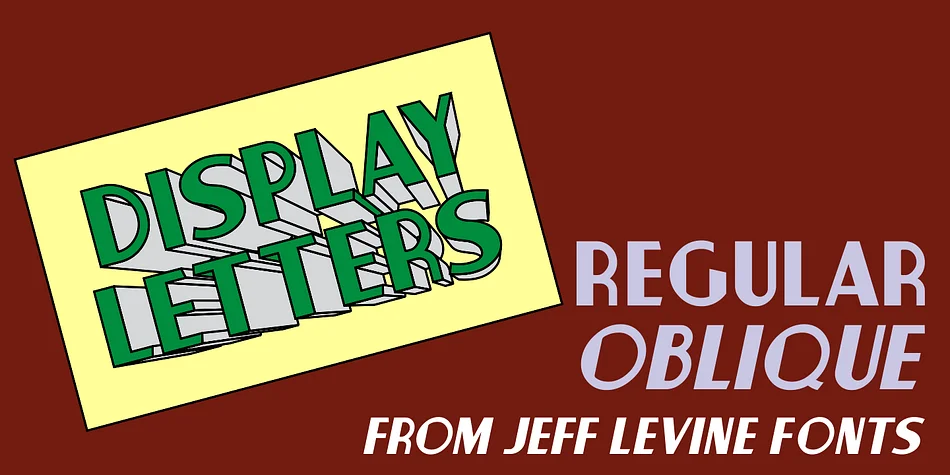
Imagine you're designing a vintage signage suite for a 1920s-inspired speakeasy, art deco hotel lobby, or historic theater revival. Display Letters JNL, designed by Jeff Levine Fonts, captures exactly that aesthetic you're reaching for. Created in the spirit of hand-cut cardboard type that sign shops supplied throughout the midcentury, this decorative face brings authentic retro credibility to display and show card work.
The thick-and-thin stroke contrast that defines Art Deco shows up beautifully throughout, giving your layouts a sense of architectural weight and precision. You'll find it shines for vinyl-cut shop signage, vintage coffee shop menus, theater marquee designs, and letterpress-inspired wedding suites. Each letterform carries that industrial exactness you'd expect from hand-cut shop type, yet they retain enough character to feel intentional rather than purely mechanical. There's a distinctive personality here that stems directly from its origin in the sign trade.
You get both regular and oblique versions, so you can choose between geometric restraint or forward-leaning dynamism depending on the mood you need. At large display sizes, the stroke variations really come alive, making this particularly strong for headline work, retro packaging redesigns, and identity systems that demand an unmistakable 1930s-40s flavor. Grab it on Creative Fabrica and start layering some genuine Art Deco atmosphere into your next project.
Style & Use Cases
- Overall Style
- Bold, Distinctive
- Use Case
- Headlines, Posters
- Ideal For
- logos, packaging, and standout titles
- Pairs With
- a neutral sans-serif
How to Install Display Letters JNL Font
Step-by-step instructions for every platform
- 1Download the Display Letters JNL font file (.ttf or .otf).
- 2Locate the downloaded file in your Downloads folder.
- 3Right-click the font file.
- 4Select "Install" to install for the current user, or "Install for all users" to make it available system-wide.
- 5Display Letters JNL is now available in Word, Photoshop, Illustrator, and all other apps.
More by Jeff Levine Fonts
View all →



Browse fonts by theme
Curated collections →Saw a font in a picture? Identify any font from an image with our free Font Finder.
More Decorative Fonts
Browse all →







What pairs well with Display Letters JNL Font?
Display Letters JNL Font is a decorative font that shines as a display or heading face. Pair it with a clean sans-serif or serif font for body text — the contrast creates a clear hierarchy while the two styles stay balanced and easy to read.




Display Letters JNL Font
Reviewed by the FontBoxDL team · Updated June 2026