 Firefox
About DINING ROOM JNL Font
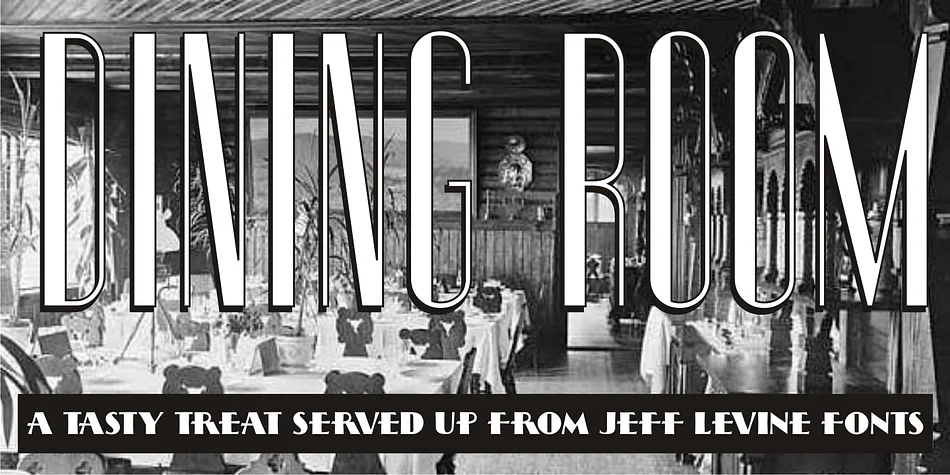
Dining Room JNL, designed by Jeff Levine Fonts, presents a strikingly balanced fusion of 1930s streamline design and Art Deco sensibility. The typeface's condensed, rounded letterforms showcase the signature vocabulary of that era: thick vertical strokes that command attention, paired with lighter weight elements creating visual drama and movement.
Drawing inspiration from Walter Huxley's 1935 foundational design, this completely redrawn typeface takes the original concept further, enriching it with even more pronounced Art Deco character. The result feels both authentically vintage and refreshingly modern. The typeface shines on vintage cocktail menus, luxury cosmetics packaging, high-end wedding invitations, and speakeasy-inspired branding, delivering the bold-yet-refined presence that brings genuine historical credibility without pastiche. The rounded letterforms soften what might otherwise be strict geometric coldness, making the vintage aesthetic warmer and more approachable for contemporary audiences.
This typeface represents a significant milestone in Jeff Levine's prolific output: the 750th design added to the library since 2006. Designers working with vintage-focused briefs will appreciate its grounding in actual Art Deco and Streamline era principles. Find it on Creative Fabrica to add authentic 1930s character to your toolkit.
Style & Use Cases
- Overall Style
- Bold, Distinctive
- Use Case
- Headlines, Posters
- Ideal For
- logos, packaging, and standout titles
- Pairs With
- a neutral sans-serif
How to Install DINING ROOM JNL Font
Step-by-step instructions for every platform
- 1Download the DINING ROOM JNL font file (.ttf or .otf).
- 2Locate the downloaded file in your Downloads folder.
- 3Right-click the font file.
- 4Select "Install" to install for the current user, or "Install for all users" to make it available system-wide.
- 5DINING ROOM JNL is now available in Word, Photoshop, Illustrator, and all other apps.
More by Jeff Levine Fonts
View all →



Browse fonts by theme
Curated collections →Saw a font in a picture? Identify any font from an image with our free Font Finder.
More Decorative Fonts
Browse all →







What pairs well with DINING ROOM JNL Font?
DINING ROOM JNL Font is a decorative font that shines as a display or heading face. Pair it with a clean sans-serif or serif font for body text — the contrast creates a clear hierarchy while the two styles stay balanced and easy to read.




DINING ROOM JNL Font
Reviewed by the FontBoxDL team · Updated June 2026