 Firefox
 1 / 8
1 / 8About Design Elements Font
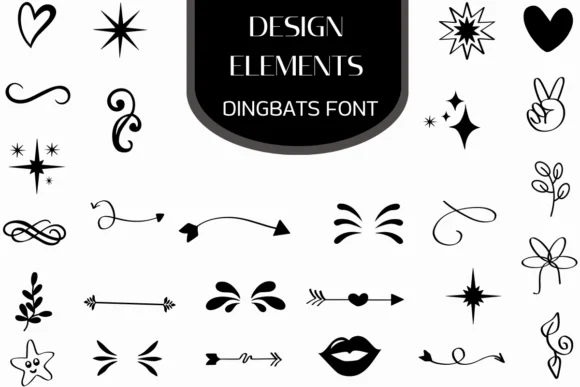
You're laying out a wedding invitation suite and need ornamental breaks between your text, something that feels handmade rather than relying on defaults. Design Elements by Heartcraft Atelier is the dingbat font you reach for first. Over 30 hand-drawn icons live here: stars, arrows, hearts, flourishes, and decorative swashes that read as genuinely sketched rather than geometric or sterile.
This collection shines on wedding invitation suites, product label designs for Etsy sellers, boutique skincare packaging, and DIY craft signage where commercial fonts feel too rigid and mass-produced. The hand-drawn quality keeps your layouts warm and human, which matters most when you're trying to stand out against factory alternatives. Drop these elements into Procreate, Affinity Designer, or Affinity Photo to layer them over existing artwork, or use them as standalone accents in your layouts. Calligraphers often pair these with script fonts to add flourish where a single letter wouldn't deliver the same impact.
Since the font comes in both OTF and TTF formats, installation works smoothly across desktop applications and creative software. The icons scale beautifully at large sizes and work just as well as small separators tucked between sections or paragraphs. Grab it on Creative Fabrica and start building layouts that feel genuinely handmade.
Style & Use Cases
- Overall Style
- Iconographic, Fonts
- Use Case
- Icons, Accents
- Ideal For
- ornaments, bullets, and decorative flourishes
- Pairs With
- any text font
How to Install Design Elements Font
Step-by-step instructions for every platform
- 1Download the Design Elements font file (.ttf or .otf).
- 2Locate the downloaded file in your Downloads folder.
- 3Right-click the font file.
- 4Select "Install" to install for the current user, or "Install for all users" to make it available system-wide.
- 5Design Elements is now available in Word, Photoshop, Illustrator, and all other apps.
More by Heartcraft Atelier
View all →



Browse fonts by theme
Curated collections →Saw a font in a picture? Identify any font from an image with our free Font Finder.
More Dingbats Fonts
Browse all →







What pairs well with Design Elements Font?
Design Elements Font is a versatile dingbats font that works for both headings and body text. Pair it with a contrasting sans-serif or serif font to add visual interest and a clear distinction between titles and body copy.




Design Elements Font
Reviewed by the FontBoxDL team · Updated June 2026