 Firefox
About DEPARTMENT STORE JNL Font
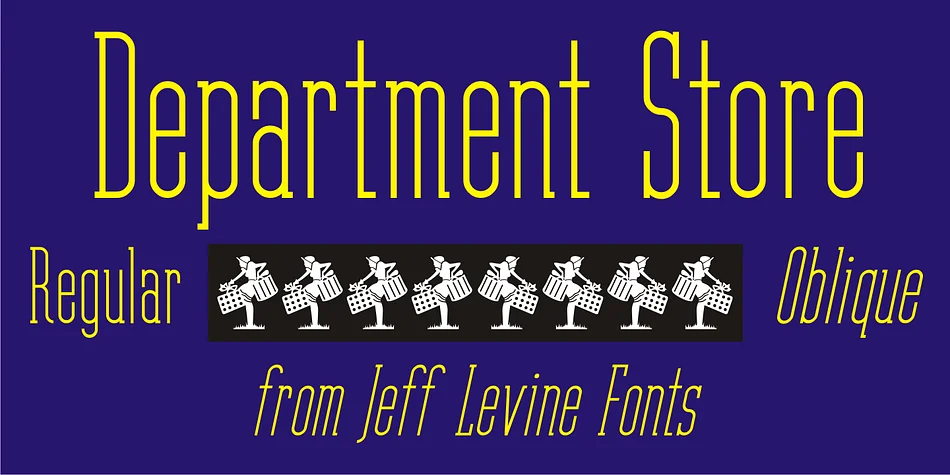
This font whispers vintage elegance with an architectural edge to every letterform. Department Store JNL, designed by Jeff Levine Fonts, captures the geometric precision of Art Deco lettering as it once appeared on storefronts and marquees throughout the early twentieth century. The thin, condensed serifs give it a refined sophistication that feels both period-authentic and strikingly contemporary, like discovering a beautifully preserved vintage storefront sign from a forgotten era.
The real strength of condensed Art Deco letterforms lies in their economy and visual punch. They're perfect for luxury wine labels, restaurant menu headers, high-end fashion lookbooks, and vintage-inspired jewelry packaging where every letter must work hard in a tight space. The typeface carries that composed, aristocratic presence whether you're working on a grand scale or something more intimate. Available in regular and oblique versions, it offers enough variation to adjust your layouts without hunting for supplementary fonts.
For the best results, pair Department Store JNL with a clean, generous sans-serif for any longer body text. This keeps your Deco letterforms in the spotlight where they belong, while ensuring your readers can breeze through any paragraph blocks comfortably. Find it on Creative Fabrica and start building that retro-luxe visual identity you've been after.
Style & Use Cases
- Overall Style
- Bold, Distinctive
- Use Case
- Headlines, Posters
- Ideal For
- logos, packaging, and standout titles
- Pairs With
- a neutral sans-serif
How to Install DEPARTMENT STORE JNL Font
Step-by-step instructions for every platform
- 1Download the DEPARTMENT STORE JNL font file (.ttf or .otf).
- 2Locate the downloaded file in your Downloads folder.
- 3Right-click the font file.
- 4Select "Install" to install for the current user, or "Install for all users" to make it available system-wide.
- 5DEPARTMENT STORE JNL is now available in Word, Photoshop, Illustrator, and all other apps.
More by Jeff Levine Fonts
View all →



Browse fonts by theme
Curated collections →Saw a font in a picture? Identify any font from an image with our free Font Finder.
More Decorative Fonts
Browse all →







What pairs well with DEPARTMENT STORE JNL Font?
DEPARTMENT STORE JNL Font is a decorative font that shines as a display or heading face. Pair it with a clean sans-serif or serif font for body text — the contrast creates a clear hierarchy while the two styles stay balanced and easy to read.




DEPARTMENT STORE JNL Font
Reviewed by the FontBoxDL team · Updated June 2026