 Firefox
 1 / 8
1 / 8About Decorate Doodle Set Font
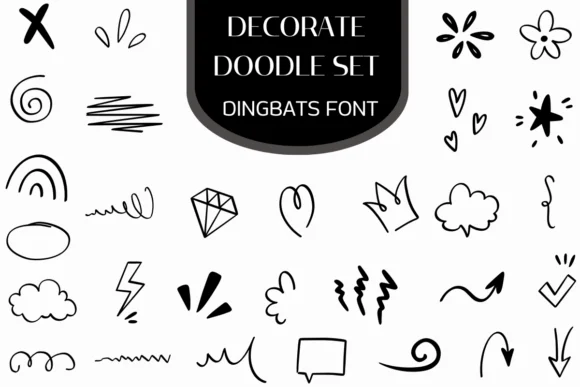
This is a playful, whimsical collection that brings authentic hand-sketched charm to any creative project. Decorate Doodle Set, created by Heartcraft Atelier, is a dingbats font packed with illustrated ornaments rather than traditional letters. You get hearts, stars, crowns, arrows, decorative swirls, and other graphic marks all drawn with a consistent pen-stroke quality that reads as intentional and cohesive throughout the set.
The real value shows up in specific applications: custom wedding invitation borders and monograms, decorative sticker designs for product packaging labels, illustrated bullet point systems for digital planners and journals, and embellished headers for social media graphics. Instead of hunting for graphics or hand-drawing ornamental elements yourself, you can simply type characters and instantly place marks anywhere you need visual interest or decoration. The consistent stroke weight means everything coordinates naturally when you're framing section headers, building custom repeating patterns, or marking delicate accents around key words and brand names.
Pair this with a handwritten script font to reinforce that sketched-by-hand aesthetic, or combine it with a clean sans-serif for strong contrast when you want the doodles to stand out visually. Get Decorate Doodle Set on Creative Fabrica and start building designs with the handmade character these ornaments bring.
Style & Use Cases
- Overall Style
- Iconographic, Fonts
- Use Case
- Icons, Accents
- Ideal For
- ornaments, bullets, and decorative flourishes
- Pairs With
- any text font
How to Install Decorate Doodle Set Font
Step-by-step instructions for every platform
- 1Download the Decorate Doodle Set font file (.ttf or .otf).
- 2Locate the downloaded file in your Downloads folder.
- 3Right-click the font file.
- 4Select "Install" to install for the current user, or "Install for all users" to make it available system-wide.
- 5Decorate Doodle Set is now available in Word, Photoshop, Illustrator, and all other apps.
More by Heartcraft Atelier
View all →



Browse fonts by theme
Curated collections →Saw a font in a picture? Identify any font from an image with our free Font Finder.
More Dingbats Fonts
Browse all →







What pairs well with Decorate Doodle Set Font?
Decorate Doodle Set Font is a versatile dingbats font that works for both headings and body text. Pair it with a contrasting sans-serif or serif font to add visual interest and a clear distinction between titles and body copy.




Decorate Doodle Set Font
Reviewed by the FontBoxDL team · Updated June 2026