 Firefox
 1 / 5
1 / 5About DECO PEN LINES JNL Font
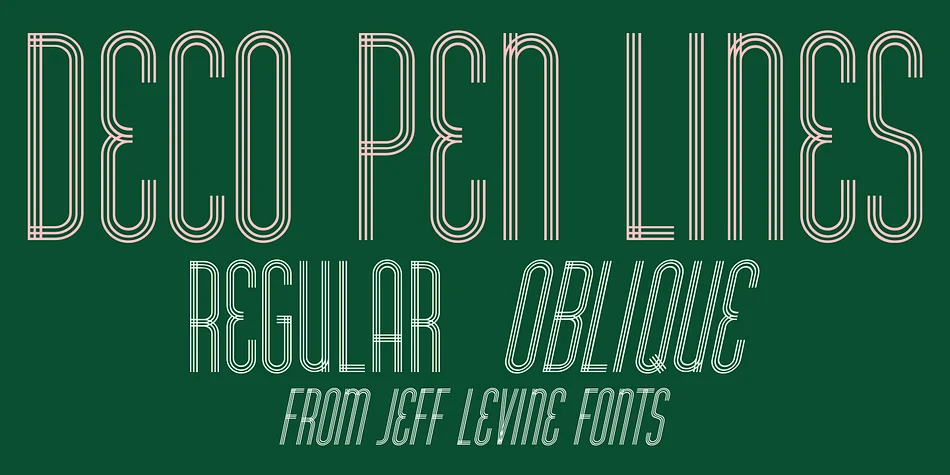
DECO PEN LINES JNL by Jeff Levine Fonts is a tall, condensed Art Deco typeface with a genuinely hand-drawn character that brings authentic 1930s glamour to modern work. Built on parallel lines that intersect and cross throughout the alphabet, it captures the unmistakable graphic boldness of vintage film advertising with both sophistication and personality.
The font's distinctive geometric structure and clean linework make it ideal for vintage theatrical posters, luxury wedding invitation suites, speakeasy menus and cocktail programs, and 1920s-inspired cosmetics labels. Each character feels deliberate and graphic, refusing to fade into the background. You'll find it works equally well as a primary display head in editorial layouts or as the striking centerpiece of a standalone design. The parallel-line construction keeps the letterforms open and modern despite their distinctly period charm.
Available in both regular and oblique versions, the typeface adapts effortlessly to different compositional needs without ever losing its visual impact. This font works beautifully for building a cohesive brand identity rooted in Art Deco aesthetics or for creating one-off vintage-themed designs. It delivers the authentic geometric detail that discerning collectors and designers actively seek. Grab DECO PEN LINES JNL from Creative Fabrica and add some genuine 1930s-style punch to your work.
Style & Use Cases
- Overall Style
- Bold, Distinctive
- Use Case
- Headlines, Posters
- Ideal For
- logos, packaging, and standout titles
- Pairs With
- a neutral sans-serif
How to Install DECO PEN LINES JNL Font
Step-by-step instructions for every platform
- 1Download the DECO PEN LINES JNL font file (.ttf or .otf).
- 2Locate the downloaded file in your Downloads folder.
- 3Right-click the font file.
- 4Select "Install" to install for the current user, or "Install for all users" to make it available system-wide.
- 5DECO PEN LINES JNL is now available in Word, Photoshop, Illustrator, and all other apps.
More by Jeff Levine Fonts
View all →



Browse fonts by theme
Curated collections →Saw a font in a picture? Identify any font from an image with our free Font Finder.
More Decorative Fonts
Browse all →







What pairs well with DECO PEN LINES JNL Font?
DECO PEN LINES JNL Font is a decorative font that shines as a display or heading face. Pair it with a clean sans-serif or serif font for body text — the contrast creates a clear hierarchy while the two styles stay balanced and easy to read.




DECO PEN LINES JNL Font
Reviewed by the FontBoxDL team · Updated June 2026