 Firefox
 1 / 10
About Debugger Font
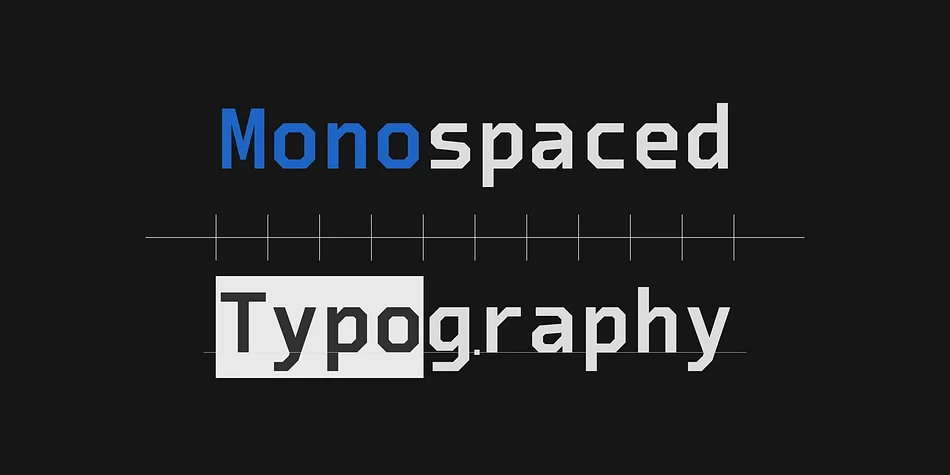
Debugger by Dharma Type is a geometric monospaced display font built for developers and tech designers who need clean, reliable letterforms in high-stress environments. The typeface tackles the core challenge of coding typography: making similar characters instantly recognizable. Zero doesn't blur with O, one stays distinct from I, and two never confuses Z.
What makes Debugger visually distinctive is its octagonal and diagonal construction. Every character is built from geometric principles that give it a distinctly digital, sci-fi aesthetic without sacrificing function. The italic weights add a mechanical slant angle (not cursive curves) and run lighter than the romans, keeping text readable in code and command-line contexts where script styles would create friction.
The family covers nearly all Latin-based languages, so it scales beyond English-only projects. You'll find it useful for tech documentation interfaces, data visualization dashboards, code editor theme design, terminal-based branding, and futuristic interface mockups that demand both clarity and visual personality. It works equally well styling algorithm visualizations for academic papers or lending a digital edge to game dev UI. Debugger treats monospaced type not as a necessary evil but as a design opportunity. Get the font on Creative Fabrica and see what your next project needs.
Style & Use Cases
- Overall Style
- Eye-catching, Bold
- Use Case
- Headlines, Logos
- Ideal For
- posters, branding, and social media graphics
- Pairs With
- a readable sans or serif for body
How to Install Debugger Font
Step-by-step instructions for every platform
- 1Download the Debugger font file (.ttf or .otf).
- 2Locate the downloaded file in your Downloads folder.
- 3Right-click the font file.
- 4Select "Install" to install for the current user, or "Install for all users" to make it available system-wide.
- 5Debugger is now available in Word, Photoshop, Illustrator, and all other apps.
More by Dharma Type
View all →


Browse fonts by theme
Curated collections →Saw a font in a picture? Identify any font from an image with our free Font Finder.
More Display Fonts
Browse all →







What pairs well with Debugger Font?
Debugger Font is a display font that shines as a display or heading face. Pair it with a clean sans-serif or serif font for body text — the contrast creates a clear hierarchy while the two styles stay balanced and easy to read.




Debugger Font
by Dharma Type
Reviewed by the FontBoxDL team · Updated October 2026