 Firefox

 1 / 8
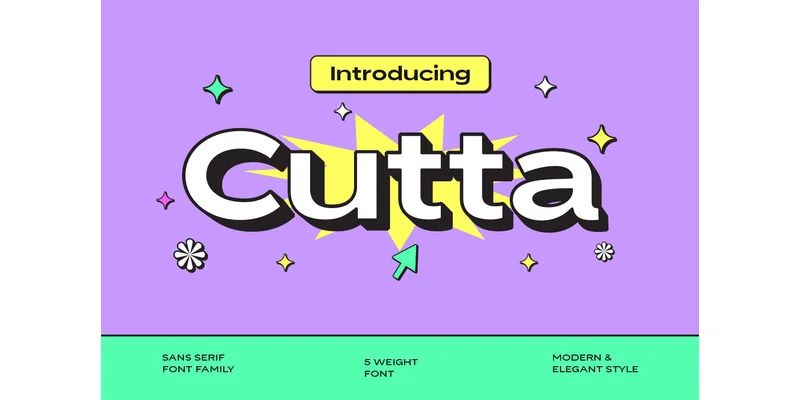
About Cutta Font
A minimalist tech startup logo, a contemporary website header, a luxury product label, or editorial packaging all demand the same core strength: a typeface that works clearly without calling attention to itself. Cutta Font, designed by yukitacreative, provides that foundation. This sans-serif comes in a range of weights from light to bold, giving you room to build visual hierarchy and tonal shifts within a single typeface family.
The font excels for interface design and brand identity systems where clarity matters most. Web designers rely on it for both headlines and body text because it reads well at any scale. Packaging designers use it for luxury goods that need restraint instead of visual noise. Self-publishers have found it valuable for laying out minimal book covers and editorial layouts where simplicity reinforces quality. At small screen sizes it remains legible, and when scaled up for signage or environmental graphics, the letterforms maintain their precision without becoming stiff.
What makes Cutta practical is how each weight maintains consistent proportions, so moving from light to bold never breaks visual flow. That stability works across corporate applications, web layouts, and anywhere hierarchy needs to feel intentional rather than imposed. Cutta Font is available on Creative Fabrica, ready to bring that clarity to your next project.
Style & Use Cases
- Overall Style
- Clean, Modern, Basic Ui
- Use Case
- Body Text, UI
- Ideal For
- branding, interfaces, and modern layouts
- Pairs With
- a contrasting serif for headings
How to Install Cutta Font Font
Step-by-step instructions for every platform
- 1Download the Cutta Font font file (.ttf or .otf).
- 2Locate the downloaded file in your Downloads folder.
- 3Right-click the font file.
- 4Select "Install" to install for the current user, or "Install for all users" to make it available system-wide.
- 5Cutta Font is now available in Word, Photoshop, Illustrator, and all other apps.
More by yukitacreative
View all →
Browse fonts by theme
Curated collections →Saw a font in a picture? Identify any font from an image with our free Font Finder.
More Sans Serif Fonts
Browse all →

What pairs well with Cutta Font?
Cutta Font is a versatile sans-serif font that works for both headings and body text. Pair it with a contrasting serif or slab serif font to add visual interest and a clear distinction between titles and body copy.
Cutta Font
Reviewed by the FontBoxDL team · Updated November 2026
One-time purchase