 Firefox
 1 / 8
1 / 8About Cute Vegetables Font
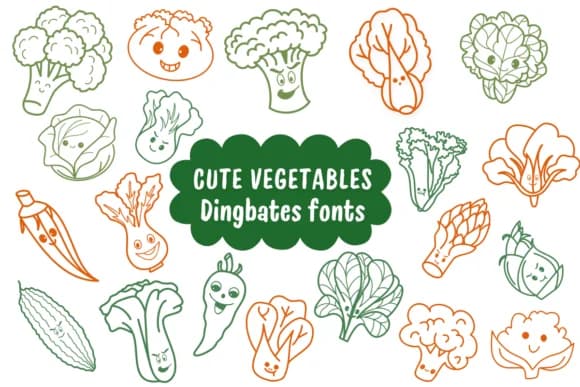
Cute Vegetables by Natchuta is a dingbats font where each key unlocks a hand-drawn veggie illustration. The collection spans from broccoli and corn to bok choy and peppers, giving you instant garden imagery without opening the design software. Crisp line work holds up perfectly for activity books, classroom labels, farm-to-table menu cards, and any project needing visual impact.
Those clean outlines work beautifully for coloring pages and sticker sheets alike. The strokes hold up under vinyl cutting, sublimation, and laser engraving without falling apart, and you can scale from tiny dingbat icons to poster-size produce across every output format. Upper and lowercase keys each offer distinct veggie illustrations and playful character faces, so you can layer variety into patterns, borders, and decorative frames without hunting for extra graphics or source files.
This font hits its stride for farmhouse kitchen signage, organic product labels, educational resources with a plant-forward angle, and DIY craft projects. Pair it with your preferred sans serif or script typeface, and you're building cohesive farm-fresh branding or whimsical learning materials that feel hand-made in the best way. Grab Cute Vegetables on Creative Fabrica to start building genuine personality into your produce-inspired designs.
Style & Use Cases
- Overall Style
- Iconographic, Fonts
- Use Case
- Icons, Accents
- Ideal For
- ornaments, bullets, and decorative flourishes
- Pairs With
- any text font
How to Install Cute Vegetables Font
Step-by-step instructions for every platform
- 1Download the Cute Vegetables font file (.ttf or .otf).
- 2Locate the downloaded file in your Downloads folder.
- 3Right-click the font file.
- 4Select "Install" to install for the current user, or "Install for all users" to make it available system-wide.
- 5Cute Vegetables is now available in Word, Photoshop, Illustrator, and all other apps.

Browse fonts by theme
Curated collections →Saw a font in a picture? Identify any font from an image with our free Font Finder.
More Dingbats Fonts
Browse all →







What pairs well with Cute Vegetables Font?
Cute Vegetables Font is a versatile dingbats font that works for both headings and body text. Pair it with a contrasting sans-serif or serif font to add visual interest and a clear distinction between titles and body copy.



Cute Vegetables Font
by Natchuta
Reviewed by the FontBoxDL team · Updated June 2026