 Firefox
 1 / 8
1 / 8Loading font…
About Cute Stickers Font
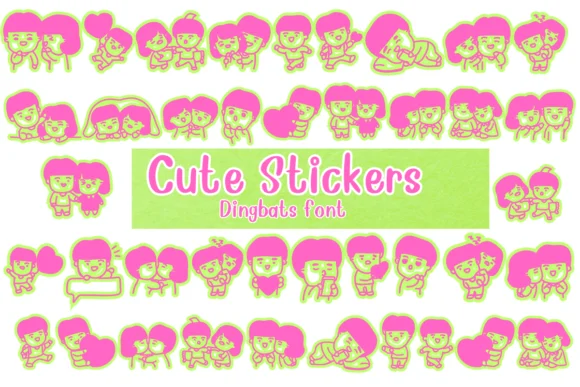
You're designing a Valentine's day greeting card suite and want ornamental flourishes that feel genuinely delightful rather than corporate and impersonal. Cute Stickers by Nongyao delivers exactly that - a dingbat font where each character becomes a cartoon illustration of coupled characters and playful figures, essentially a keyboard-accessible library of stickers you can place anywhere text would normally go.
What makes this different from standard ornament fonts is how versatile the character set really is across different project types. Custom greeting card collections gain immediate charm when you mix these illustrated pairs with your typography, giving each card a handcrafted feel that stands out in inboxes. Planner page designs and bullet journal spreads use the sticker characters beautifully as sectioning elements and visual anchors that break up text. Wedding invitation suites benefit significantly when you need decorative touches that read as hand-drawn rather than generic templates. Digital sticker sheet designs for Etsy also showcase the cartoon aesthetic in ways that feel fresh, intentional, and genuinely appealing to modern audiences.
The font includes both outline and solid versions of each character, letting you add your own color palette or use them filled for bold graphic layouts. Multiple weights provide flexibility depending on your specific design direction and project needs. Grab Cute Stickers on Creative Fabrica to start bringing these playful characters into your next design.
Style & Use Cases
- Overall Style
- Iconographic, Fonts
- Use Case
- Icons, Accents
- Ideal For
- ornaments, bullets, and decorative flourishes
- Pairs With
- any text font
How to Install Cute Stickers Font
Step-by-step instructions for every platform
- 1Download the Cute Stickers font file (.ttf or .otf).
- 2Locate the downloaded file in your Downloads folder.
- 3Right-click the font file.
- 4Select "Install" to install for the current user, or "Install for all users" to make it available system-wide.
- 5Cute Stickers is now available in Word, Photoshop, Illustrator, and all other apps.




Browse fonts by theme
Curated collections →Saw a font in a picture? Identify any font from an image with our free Font Finder.
More Dingbats Fonts
Browse all →







What pairs well with Cute Stickers Font?
Cute Stickers Font is a versatile dingbats font that works for both headings and body text. Pair it with a contrasting sans-serif or serif font to add visual interest and a clear distinction between titles and body copy.




Cute Stickers Font
by Nongyao
Reviewed by the FontBoxDL team · Updated October 2026