 Firefox
 1 / 8
1 / 8About Cute Doodle Whimsy Font
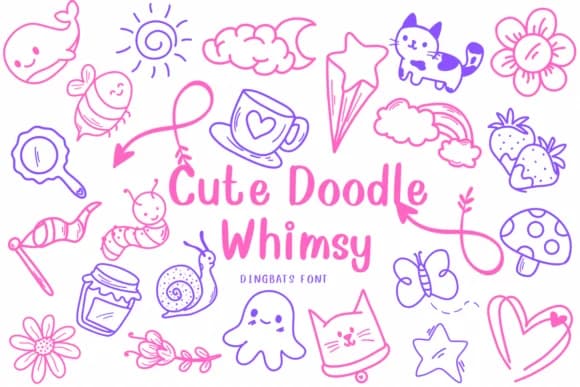
This font brings instant joy and playfulness to any design. Cute Doodle Whimsy, created by CHANOK, is a dingbats collection that trades complexity for hand-drawn charm and character. The set is packed with illustrations including flowers, stars, candy elements, and decorative flourishes that feel personal and approachable rather than slick or over-rendered.
Versatility is where this font really shines. Use it for wedding invitation suites that need a casual, intimate feel, or tap into the candy and food motifs for small-batch bakery labels and homemade confectionery packaging. Handmade gift tags, children's book illustrations, and scrapbooking layouts all benefit from the hatching details and cartoon sensibility built into each glyph. DIY craft enthusiasts will find themselves reaching for this one repeatedly, especially when designing greeting cards, custom labels for jars, or hand-lettered wall art for a nursery or kids' space.
Since dingbats work best alongside readable body copy, pair Cute Doodle Whimsy with a clean, minimal sans-serif that won't compete for attention. This balance lets the playful icons shine while keeping your layout functional and legible. Grab it on Creative Fabrica and start adding some genuine whimsy to your next project.
Style & Use Cases
- Overall Style
- Iconographic, Sweet Food
- Use Case
- Icons, Accents
- Ideal For
- ornaments, bullets, and decorative flourishes
- Pairs With
- any text font
How to Install Cute Doodle Whimsy Font
Step-by-step instructions for every platform
- 1Download the Cute Doodle Whimsy font file (.ttf or .otf).
- 2Locate the downloaded file in your Downloads folder.
- 3Right-click the font file.
- 4Select "Install" to install for the current user, or "Install for all users" to make it available system-wide.
- 5Cute Doodle Whimsy is now available in Word, Photoshop, Illustrator, and all other apps.
More by CHANOK
View all →

Browse fonts by theme
Curated collections →Saw a font in a picture? Identify any font from an image with our free Font Finder.
More Dingbats Fonts
Browse all →







What pairs well with Cute Doodle Whimsy Font?
Cute Doodle Whimsy Font is a versatile dingbats font that works for both headings and body text. Pair it with a contrasting sans-serif or serif font to add visual interest and a clear distinction between titles and body copy.



Cute Doodle Whimsy Font
by CHANOK
Reviewed by the FontBoxDL team · Updated July 2026