 Firefox
 1 / 8
1 / 8About Cute Doodle Icons Font
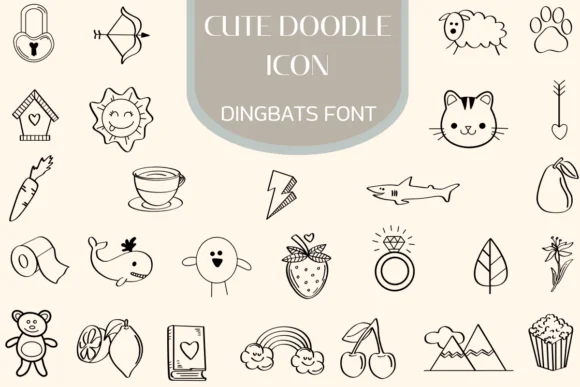
Cute Doodle Icons from Heartcraft Atelier is a collection of hand-illustrated icons that capture the charm of sketch-style doodling at genuine scale. Instead of letters, this dingbats font delivers a rich set of playful motifs: friendly creatures (cats, bears, sheep), natural imagery (sun, rainbow, mountains), and everyday items (teacups, strawberries, birdhouses) all rendered with a consistent stroke weight that preserves their organic, sketched appearance without sacrificing clarity or legibility.
The illustrations work beautifully for designers working on baby shower invitation suites, indie product label design, and handmade thank you card layouts. It's equally suited to DIY journal spreads, Etsy sticker designs, and gift tag illustrations where that deliberate, hand-drawn aesthetic really matters. The consistent line quality keeps everything readable at small sizes while maintaining genuine personality and warmth. Each icon carries that authentic doodle feel you'd normally hand-draw yourself, complete with the organic quirks that make hand-doodled work feel personal.
This font serves creatives and illustrators who want a shortcut to authentic doodle elements without the time investment of drawing each icon individually. Whether you're designing brand materials for boutique shops or laying out a personal planner, the versatility here saves real time and effort. Find it on Creative Fabrica and add it to your design toolkit.
Style & Use Cases
- Overall Style
- Iconographic, Fonts
- Use Case
- Icons, Accents
- Ideal For
- ornaments, bullets, and decorative flourishes
- Pairs With
- any text font
How to Install Cute Doodle Icons Font
Step-by-step instructions for every platform
- 1Download the Cute Doodle Icons font file (.ttf or .otf).
- 2Locate the downloaded file in your Downloads folder.
- 3Right-click the font file.
- 4Select "Install" to install for the current user, or "Install for all users" to make it available system-wide.
- 5Cute Doodle Icons is now available in Word, Photoshop, Illustrator, and all other apps.
More by Heartcraft Atelier
View all →



Browse fonts by theme
Curated collections →Saw a font in a picture? Identify any font from an image with our free Font Finder.
More Dingbats Fonts
Browse all →







What pairs well with Cute Doodle Icons Font?
Cute Doodle Icons Font is a versatile dingbats font that works for both headings and body text. Pair it with a contrasting sans-serif or serif font to add visual interest and a clear distinction between titles and body copy.




Cute Doodle Icons Font
Reviewed by the FontBoxDL team · Updated June 2026