 Firefox
 1 / 7
1 / 7About Cute Cloud Font
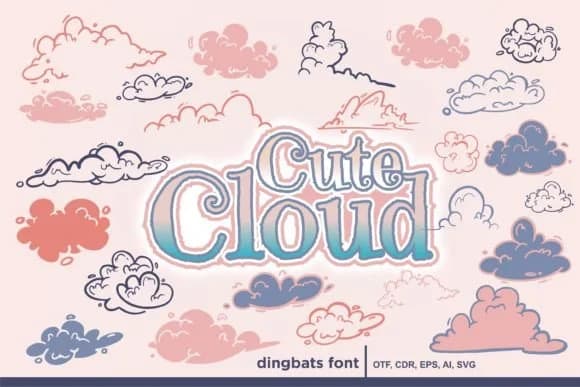
Picture arranging a stack of baby shower invitations, each one needing something that feels warm and playful without trying too hard. Cute Cloud, created by onoborgol, is a dingbats font built for exactly these moments. The handdrawn character sits somewhere between illustration and typography, giving you cloud shapes, weather symbols, and whimsical accents that feel genuinely sketch-like rather than polished or sterile. It's the kind of font that looks like it was drawn by hand and then brought into the digital world, keeping all its organic charm and character intact.
You'll find it most at home in birth announcements and nursery decor, where its soft personality suits the occasion. Planner stickers, children's birthday party materials, and greeting card suites all benefit from its playful temperament. The vector-based construction means it scales cleanly from small sticker sheets to large signage on handmade goods without losing a trace of the handdrawn quality that makes it special.
That imperfection in each glyph, the slight wobble and character, actually improves at bigger sizes, reading as intentional charm rather than a limitation. If you're tired of dingbats that feel generic or overdone, Cute Cloud brings genuine warmth to your work. Find it on Creative Fabrica.
Style & Use Cases
- Overall Style
- Iconographic, Cute Fonts
- Use Case
- Icons, Accents
- Ideal For
- ornaments, bullets, and decorative flourishes
- Pairs With
- any text font
How to Install Cute Cloud Font
Step-by-step instructions for every platform
- 1Download the Cute Cloud font file (.ttf or .otf).
- 2Locate the downloaded file in your Downloads folder.
- 3Right-click the font file.
- 4Select "Install" to install for the current user, or "Install for all users" to make it available system-wide.
- 5Cute Cloud is now available in Word, Photoshop, Illustrator, and all other apps.
More by onoborgol
View all →
Browse fonts by theme
Curated collections →Saw a font in a picture? Identify any font from an image with our free Font Finder.
More Dingbats Fonts
Browse all →







What pairs well with Cute Cloud Font?
Cute Cloud Font is a versatile dingbats font that works for both headings and body text. Pair it with a contrasting sans-serif or serif font to add visual interest and a clear distinction between titles and body copy.



Cute Cloud Font
by onoborgol
Reviewed by the FontBoxDL team · Updated July 2026