
 1 / 5
1 / 5About Cupcakia Font
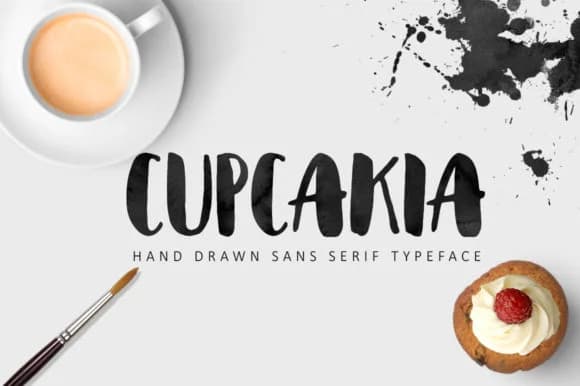
Picture yourself designing packaging for a local bakery or menu cards for a cupcake shop where the lettering needs to feel both handmade and polished at the same time. Cupcakia, the handwritten brush script by Tabita's shop, delivers that exact balance. The playful, sketched letterforms bring movement and personality without sacrificing readability or looking careless.
What makes this typeface special is how well it works across different projects and contexts. You'll reach for it for bakery labels and pricing tags, greeting card suites, boutique food packaging, hand-lettered poster headers, Instagram story graphics, and DIY wedding invitations. Each application feels natural because the slightly imperfect letterforms read as intentional, like they were drawn by hand specifically for your design. The weight stays consistent throughout the alphabet, which keeps everything legible no matter your chosen scale. Those brush-stroke details remain visible and charming whether you're using it for a bold headline or smaller supporting text, making this a real tool for designers who need handmade character alongside professional polish.
The consistent weight at various sizes means you can scale it freely without losing any charm. Grab Cupcakia on Creative Fabrica and start bringing this playful hand-drawn aesthetic to all your work.
Style & Use Cases
- Overall Style
- Elegant, Flowing, Cupcakia
- Use Case
- Invitations, Branding
- Ideal For
- wedding stationery, greeting cards, and signatures
- Pairs With
- a simple uppercase sans
How to Install Cupcakia Font Font
Step-by-step instructions for every platform
- 1Download the Cupcakia Font font file (.ttf or .otf).
- 2Locate the downloaded file in your Downloads folder.
- 3Right-click the font file.
- 4Select "Install" to install for the current user, or "Install for all users" to make it available system-wide.
- 5Cupcakia Font is now available in Word, Photoshop, Illustrator, and all other apps.
More by Tabita's shop
View all →
More Script Handwritten Fonts
Browse all →







What pairs well with Cupcakia Font?
Cupcakia Font is a script font that shines as a display or heading face. Pair it with a clean sans-serif or serif font for body text — the contrast creates a clear hierarchy while the two styles stay balanced and easy to read.



Cupcakia Font
Reviewed by the FontBoxDL team · Updated June 2026