
 1 / 7
1 / 7About Crowns Font
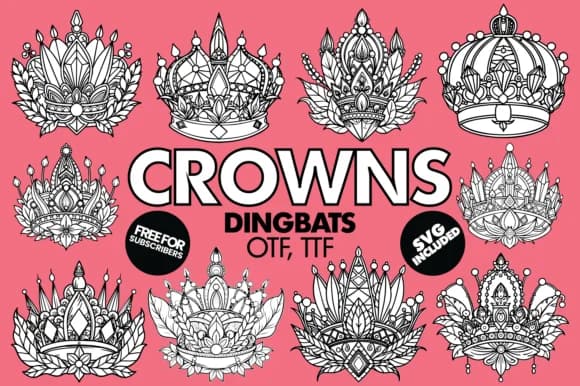
Crowns, designed by Minimalistartstudio, is a dingbat collection that trades generic ornament clipart for genuinely distinctive crown illustrations. With 37 glyphs that combine intricate jeweled details and botanical flourishes, each one is refined enough to stand alone or nestle into layout as a subtle accent. Their hand-drawn character gives these icons personality, a quality that matters when you're trying to set a brand apart from the usual template aesthetic.
This font works wonderfully for wedding invitation suites, luxury packaging design for boutique beauty brands, artisanal jewelry labels, and upscale stationery. You'll also find them useful as decorative flourishes on Etsy product photography, custom craft signage, or small-business branding collateral. The variety across the glyph set means you're not locked into repeating the same crown shape, so layering and composition have real flexibility. Available in both OTF and TTF, the glyphs render cleanly whether you're printing at scale or embedding them into digital layouts.
For designers and makers who need ornament with edge, something regal that doesn't scream "stock image," Crowns is built exactly for that job. If you work in luxury retail, paper goods, or high-end craft, this font deserves a spot in your toolkit. Find it on Creative Fabrica and integrate it into your next project.
Style & Use Cases
- Overall Style
- Iconographic, Crowns Dingbats Font
- Use Case
- Icons, Accents
- Ideal For
- ornaments, bullets, and decorative flourishes
- Pairs With
- any text font
How to Install Crowns Font
Step-by-step instructions for every platform
- 1Download the Crowns font file (.ttf or .otf).
- 2Locate the downloaded file in your Downloads folder.
- 3Right-click the font file.
- 4Select "Install" to install for the current user, or "Install for all users" to make it available system-wide.
- 5Crowns is now available in Word, Photoshop, Illustrator, and all other apps.
More by Minimalistartstudio
View all →



Browse fonts by theme
Curated collections →Saw a font in a picture? Identify any font from an image with our free Font Finder.
More Dingbats Fonts
Browse all →







What pairs well with Crowns Font?
Crowns Font is a versatile dingbats font that works for both headings and body text. Pair it with a contrasting sans-serif or serif font to add visual interest and a clear distinction between titles and body copy.



Crowns Font
Reviewed by the FontBoxDL team · Updated July 2026