 Firefox
 1 / 8
1 / 8About Crown Font
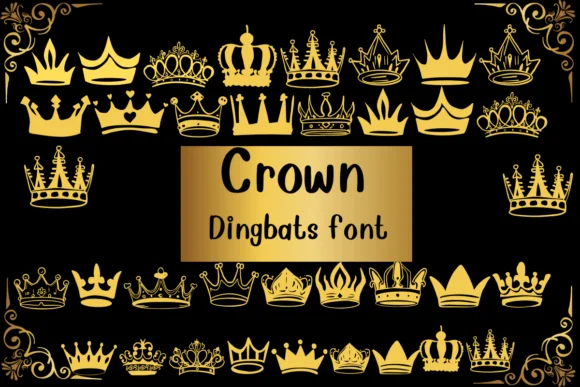
Imagine you're designing a wedding invitation suite with regal accents or perhaps a children's book about princesses and kings. Crown by Nongyao is a dingbat font where each keystroke places a different crown illustration on your canvas. Unlike traditional text fonts, this illustrative approach adds decorative royal symbolism with ease. It's available in outline formats too, giving you flexibility for custom coloring and fill options.
Crown works beautifully in wedding invitation suites, children's book illustrations, boutique packaging for luxury brands, and DIY craft projects centered on fairy tale themes. The coloring outline capability means you can create two-tone effects or add fills with your chosen palette, expanding your design possibilities significantly. From logo systems with royal iconography to printable coloring pages and merchandise featuring regal doodles, this font delivers consistent, polished illustrations with each keystroke. Each character is a distinct crown design, so you get genuine variety.
The font renders cleanly at large sizes and integrates well with Procreate, Affinity Designer, and standard design software. For any project needing ornamental royal elements, it's a solid addition to your dingbat collection. Grab it from Creative Fabrica.
Style & Use Cases
- Overall Style
- Iconographic, Fonts
- Use Case
- Icons, Accents
- Ideal For
- ornaments, bullets, and decorative flourishes
- Pairs With
- any text font
How to Install Crown Font
Step-by-step instructions for every platform
- 1Download the Crown font file (.ttf or .otf).
- 2Locate the downloaded file in your Downloads folder.
- 3Right-click the font file.
- 4Select "Install" to install for the current user, or "Install for all users" to make it available system-wide.
- 5Crown is now available in Word, Photoshop, Illustrator, and all other apps.

Browse fonts by theme
Curated collections →Saw a font in a picture? Identify any font from an image with our free Font Finder.
More Dingbats Fonts
Browse all →






What pairs well with Crown Font?
Crown Font is a versatile dingbats font that works for both headings and body text. Pair it with a contrasting sans-serif or serif font to add visual interest and a clear distinction between titles and body copy.




Crown Font
by Nongyao
Reviewed by the FontBoxDL team · Updated June 2026