
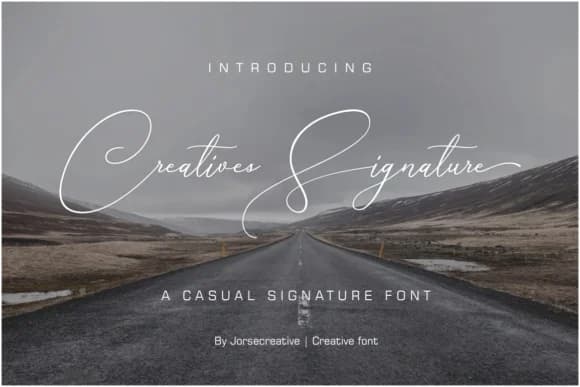
 1 / 10
About Creative Signature Font
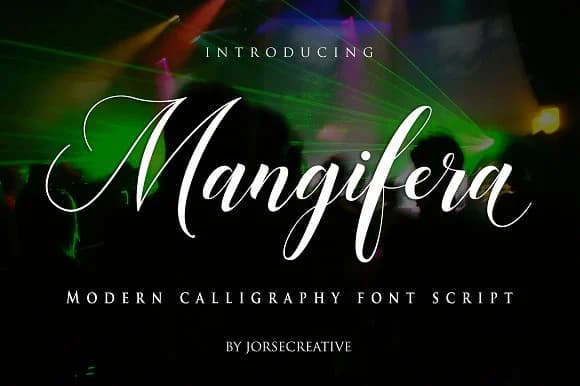
Creative Signature Font by Jorse Creative is a handwritten script typeface that masterfully bridges the gap between personal warmth and polished sophistication. Featuring flowing, expressive letterforms inspired by authentic penmanship, the typeface brings genuine character to designs while maintaining the clarity and consistency required for professional applications. The balanced proportions and thoughtful letter spacing ensure this script commands attention without compromising readability across different scales and contexts, making it accessible for diverse design needs.
This distinctive script excels in creating memorable designs for upscale wedding stationery including invitation suites, response cards, and ceremony programs where elegance matters. It's equally suited for cosmetics and skincare brand packaging that relies on conveying luxury and personal care, personalized gift tags and handmade product labels where authenticity is essential, and digital applications like social media graphics, poetic quote imagery, and personalized greeting cards that benefit from a human touch. The thoughtful character set provides comprehensive support for multilingual projects, while the consistent letterforms work effectively at both display and body text sizes, from headline usage to extended reading passages. Whether you're building a luxury brand identity or designing intimate personal stationery, this typeface delivers the handcrafted aesthetic modern audiences appreciate.
Discover the authentic charm of Creative Signature Font on Creative Fabrica and bring genuine, professional-grade personality to your next creative project.
Style & Use Cases
- Overall Style
- Elegant, Flowing, Creative Signature
- Use Case
- Invitations, Branding
- Ideal For
- wedding stationery, greeting cards, and signatures
- Pairs With
- a simple uppercase sans
How to Install Creative Signature Font Font
Step-by-step instructions for every platform
- 1Download the Creative Signature Font font file (.ttf or .otf).
- 2Locate the downloaded file in your Downloads folder.
- 3Right-click the font file.
- 4Select "Install" to install for the current user, or "Install for all users" to make it available system-wide.
- 5Creative Signature Font is now available in Word, Photoshop, Illustrator, and all other apps.
More by Jorse Creative
View all →
More Script Handwritten Fonts
Browse all →







What pairs well with Creative Signature Font?
Creative Signature Font is a script font that shines as a display or heading face. Pair it with a clean sans-serif or serif font for body text — the contrast creates a clear hierarchy while the two styles stay balanced and easy to read.



Creative Signature Font
Reviewed by the FontBoxDL team · Updated May 2026