 Firefox
 1 / 6
1 / 6About COUNTER SERVICE JNL Font
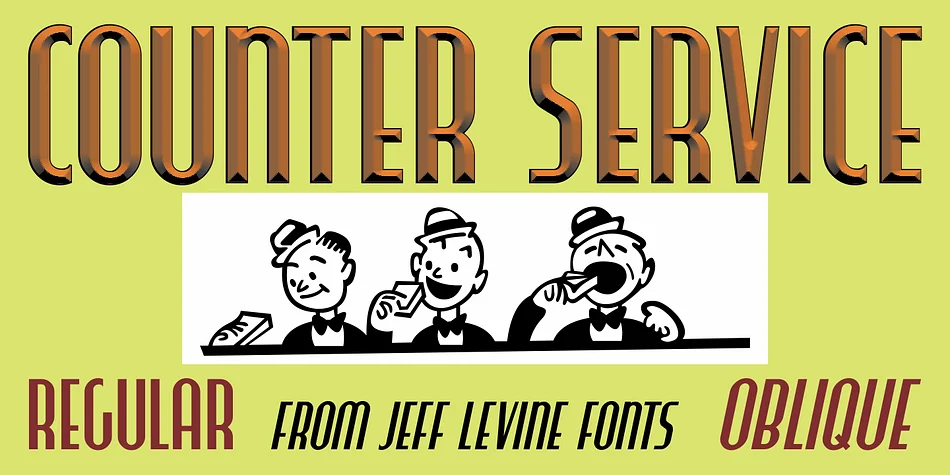
Retro energy meets architectural precision. Counter Service JNL, designed by Jeff Levine Fonts, channels the geometric snap of mid-century Americana. Drawn from hand lettering found on a 1958 restaurant menu named "Chickland," this display typeface harks back to Art Deco sensibilities, marrying condensed proportions with dramatic weight contrast between thick and thin strokes. Starting from just a handful of original letterforms, the designer expanded it into a complete and usable character set. Available in both regular and oblique versions, it handles printed materials and digital applications with equal confidence and assurance.
It works exceptionally well for vintage-inspired restaurant branding and menu design, craft cocktail packaging and bar signage, vinyl record labels and poster applications, and mid-century modern event invitations and announcements. The typography carries inherent rhythm and movement, making it ideal for headlines and display work that needs distinct personality. Structural simplicity ensures it remains legible even at smaller scales, yet it truly shines when given proper breathing room on a cover or marquee. Pair it with a straightforward sans-serif like Helvetica or another clean geometric option for supporting text, letting Counter Service command the visual spotlight. Find it on Creative Fabrica, ready to bring authentic retro character to your next design.
Style & Use Cases
- Overall Style
- Bold, Distinctive
- Use Case
- Headlines, Posters
- Ideal For
- logos, packaging, and standout titles
- Pairs With
- a neutral sans-serif
How to Install COUNTER SERVICE JNL Font
Step-by-step instructions for every platform
- 1Download the COUNTER SERVICE JNL font file (.ttf or .otf).
- 2Locate the downloaded file in your Downloads folder.
- 3Right-click the font file.
- 4Select "Install" to install for the current user, or "Install for all users" to make it available system-wide.
- 5COUNTER SERVICE JNL is now available in Word, Photoshop, Illustrator, and all other apps.
More by Jeff Levine Fonts
View all →



Browse fonts by theme
Curated collections →Saw a font in a picture? Identify any font from an image with our free Font Finder.
More Decorative Fonts
Browse all →







What pairs well with COUNTER SERVICE JNL Font?
COUNTER SERVICE JNL Font is a decorative font that shines as a display or heading face. Pair it with a clean sans-serif or serif font for body text — the contrast creates a clear hierarchy while the two styles stay balanced and easy to read.




COUNTER SERVICE JNL Font
Reviewed by the FontBoxDL team · Updated June 2026