 Firefox
 1 / 8
1 / 8Loading font…
About Coral Font
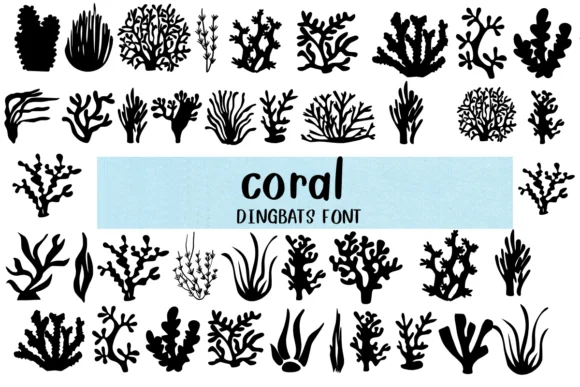
Coral by Nongyao is a pictorial dingbat font that replaces letters with hand-drawn ocean imagery. Instead of typing characters, you get seashells, starfish, sea plants, coral formations, and other reef dwellers arranged across the keyboard. The outlined, cartoon-like quality gives everything a friendly, playful feel that works well across both digital and print contexts.
This font shines when visual storytelling matters. Underwater-themed children's book illustrations benefit from the repeating organic shapes, while nautical wedding invitations gain character through decorative borders and flourishes built from these elements. Scrapbooking layouts with ocean motifs become more dynamic when you layer text with these illustrated marks. Coloring book spreads designed around sea life are a natural fit too, since the outline style lets readers add their own details.
Beyond traditional design work, Coral supports greeting cards, product labels for aquarium brands or nautical shops, and social media graphics that need personality without looking generic. Each glyph reads as a miniature illustration rather than mere decoration, which makes the font feel more intentional in any composition. Grab it from Creative Fabrica and discover how these ocean graphics can strengthen your next project.
Style & Use Cases
- Overall Style
- Iconographic, Fonts
- Use Case
- Icons, Accents
- Ideal For
- ornaments, bullets, and decorative flourishes
- Pairs With
- any text font
How to Install Coral Font
Step-by-step instructions for every platform
- 1Download the Coral font file (.ttf or .otf).
- 2Locate the downloaded file in your Downloads folder.
- 3Right-click the font file.
- 4Select "Install" to install for the current user, or "Install for all users" to make it available system-wide.
- 5Coral is now available in Word, Photoshop, Illustrator, and all other apps.




Browse fonts by theme
Curated collections →Saw a font in a picture? Identify any font from an image with our free Font Finder.
More Dingbats Fonts
Browse all →







What pairs well with Coral Font?
Coral Font is a versatile dingbats font that works for both headings and body text. Pair it with a contrasting sans-serif or serif font to add visual interest and a clear distinction between titles and body copy.




Coral Font
by Nongyao
Reviewed by the FontBoxDL team · Updated October 2026