 Firefox
 1 / 2
1 / 2About COLMAR JNL Font
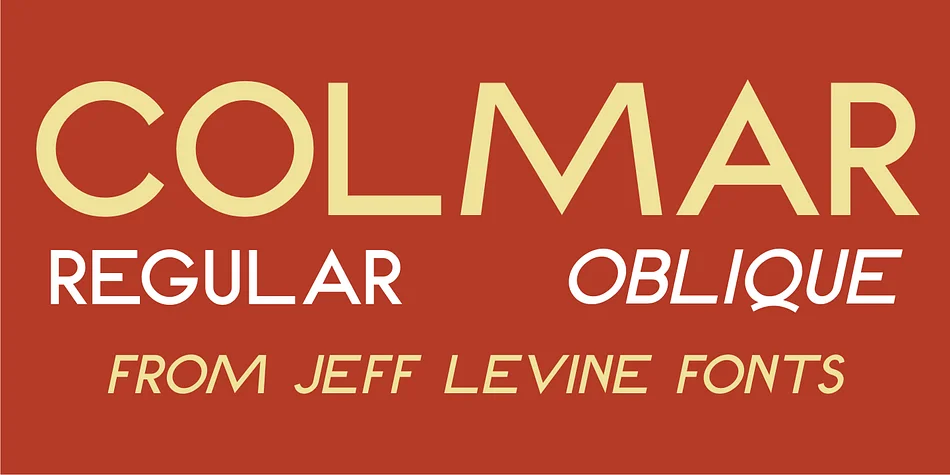
There's a refined elegance here that speaks to design with history and intention. Colmar JNL, created by Jeff Levine Fonts, draws from 1930s French Art Deco lettering and brings that sophisticated geometry into the digital realm. Sourced from a 1934 design manual focused on rational letterform construction, this revival captures that careful, architectural quality that Art Deco does so well. Named after Colmar, the historic city in France's Alsace region, the typeface grounds itself in cultural context and visual substance.
This decorative sans shines for vintage wedding invitation suites, upscale restaurant menus, boutique cosmetics packaging, and art gallery exhibition posters. Its varying character widths give it genuine personality without sacrificing clarity, and both regular and oblique versions offer real flexibility for your layouts. Distinctly glamorous and geometric, it feels equally at home on luxury packaging or period-inspired design work that demands attention and polish.
Pair it with a clean, contemporary sans-serif like a geometric typeface for body copy to let Colmar JNL be your statement display face. It's a font that rewards careful design thinking and works best when given room to breathe. You can grab it on Creative Fabrica whenever you're ready to bring that timeless Art Deco spirit into your next project.
Style & Use Cases
- Overall Style
- Bold, Distinctive
- Use Case
- Headlines, Posters
- Ideal For
- logos, packaging, and standout titles
- Pairs With
- a neutral sans-serif
How to Install COLMAR JNL Font
Step-by-step instructions for every platform
- 1Download the COLMAR JNL font file (.ttf or .otf).
- 2Locate the downloaded file in your Downloads folder.
- 3Right-click the font file.
- 4Select "Install" to install for the current user, or "Install for all users" to make it available system-wide.
- 5COLMAR JNL is now available in Word, Photoshop, Illustrator, and all other apps.
More by Jeff Levine Fonts
View all →



Browse fonts by theme
Curated collections →Saw a font in a picture? Identify any font from an image with our free Font Finder.
More Decorative Fonts
Browse all →







What pairs well with COLMAR JNL Font?
COLMAR JNL Font is a decorative font that shines as a display or heading face. Pair it with a clean sans-serif or serif font for body text — the contrast creates a clear hierarchy while the two styles stay balanced and easy to read.




COLMAR JNL Font
Reviewed by the FontBoxDL team · Updated June 2026