 Firefox
 1 / 8
1 / 8About Clover Font
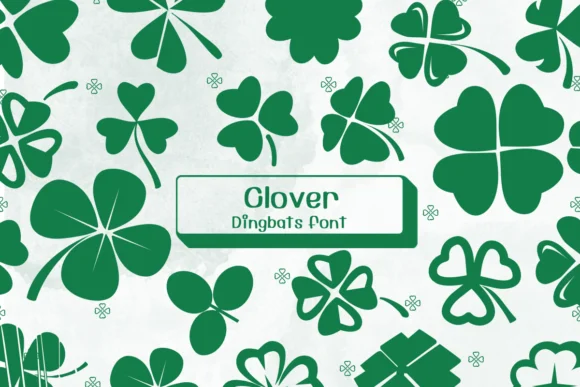
If you want designs that feel grounded in nature and carry a hint of whimsy, this font delivers exactly that. Clover by Ketsarin uses a full set of clover leaf symbols, each uniquely rendered to bring an organic, hand-drawn quality to your work without looking overly rustic or processed.
Think of Clover for pressed flower bookmarks, autumn scrapbook layouts, woodland wedding invitations, or kraft label designs for small batch goods. The variety in each character means you can mix and match within a single layout without repetition feeling flat or predictable. Because each glyph is its own unique clover, you get natural rhythm when you layer them across a page or card. It works just as well on screen (Procreate, Affinity Designer) as it does in print workflows, with both OTF and TTF formats included so you have options across your tools and devices.
Pair it with a light, open sans-serif like Trebuchet or Inter to let the dingbats breathe freely on cards or decorative covers. The contrast will keep the overall design clean instead of feeling busy or cluttered. Grab it from Creative Fabrica and start using four-leaf symbolism to bring a natural, collected, earthy feel to your next project.
Style & Use Cases
- Overall Style
- Iconographic, Fonts
- Use Case
- Icons, Accents
- Ideal For
- ornaments, bullets, and decorative flourishes
- Pairs With
- any text font
How to Install Clover Font
Step-by-step instructions for every platform
- 1Download the Clover font file (.ttf or .otf).
- 2Locate the downloaded file in your Downloads folder.
- 3Right-click the font file.
- 4Select "Install" to install for the current user, or "Install for all users" to make it available system-wide.
- 5Clover is now available in Word, Photoshop, Illustrator, and all other apps.
More by Ketsarin
View all →
Browse fonts by theme
Curated collections →Saw a font in a picture? Identify any font from an image with our free Font Finder.
More Dingbats Fonts
Browse all →







What pairs well with Clover Font?
Clover Font is a versatile dingbats font that works for both headings and body text. Pair it with a contrasting sans-serif or serif font to add visual interest and a clear distinction between titles and body copy.




Clover Font
by Ketsarin
Reviewed by the FontBoxDL team · Updated July 2026