 Firefox
 1 / 5
1 / 5About Classic Nouveau JNL Font
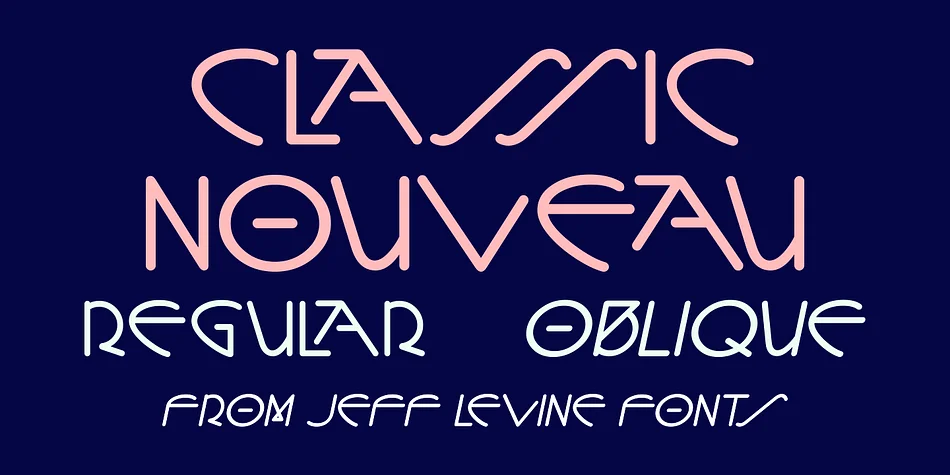
Picture designing a 1920s-themed cosmetics brand or refreshing an art deco book cover. Classic Nouveau JNL, created by Jeff Levine Fonts, captures that exact era. The typeface draws inspiration from a 1919 hand-lettered title block featured in Motion Picture Classic magazine, where a round nib pen produced its signature stylized Art Nouveau letterforms with flowing, organic curves and generous proportions.
This decorative typeface excels at bringing period authenticity to vintage cosmetics labels, antique shop signage, boutique product packaging, and DIY greeting card suites. The structured yet expressive letters read beautifully at large display sizes, maintaining legibility while preserving the handwritten aesthetic that makes Art Nouveau so visually distinctive. Character construction shows uniform stroke weight throughout, which gives the alphabet a cohesive, almost calligraphic feel.
Classic Nouveau JNL comes in both regular and oblique versions, letting you build visual hierarchy without reaching for another typeface. The oblique option adds movement to title work while maintaining the same foundational letterforms, which makes it surprisingly versatile for a decorative face. Grab it on Creative Fabrica to start bringing 1920s elegance to your designs.
Style & Use Cases
- Overall Style
- Bold, Distinctive
- Use Case
- Headlines, Posters
- Ideal For
- logos, packaging, and standout titles
- Pairs With
- a neutral sans-serif
How to Install Classic Nouveau JNL Font
Step-by-step instructions for every platform
- 1Download the Classic Nouveau JNL font file (.ttf or .otf).
- 2Locate the downloaded file in your Downloads folder.
- 3Right-click the font file.
- 4Select "Install" to install for the current user, or "Install for all users" to make it available system-wide.
- 5Classic Nouveau JNL is now available in Word, Photoshop, Illustrator, and all other apps.
More by Jeff Levine Fonts
View all →



Browse fonts by theme
Curated collections →Saw a font in a picture? Identify any font from an image with our free Font Finder.
More Decorative Fonts
Browse all →







What pairs well with Classic Nouveau JNL Font?
Classic Nouveau JNL Font is a decorative font that shines as a display or heading face. Pair it with a clean sans-serif or serif font for body text — the contrast creates a clear hierarchy while the two styles stay balanced and easy to read.




Classic Nouveau JNL Font
Reviewed by the FontBoxDL team · Updated June 2026