 Firefox
 1 / 5
1 / 5About CINEMA NOUVEAU JNL Font
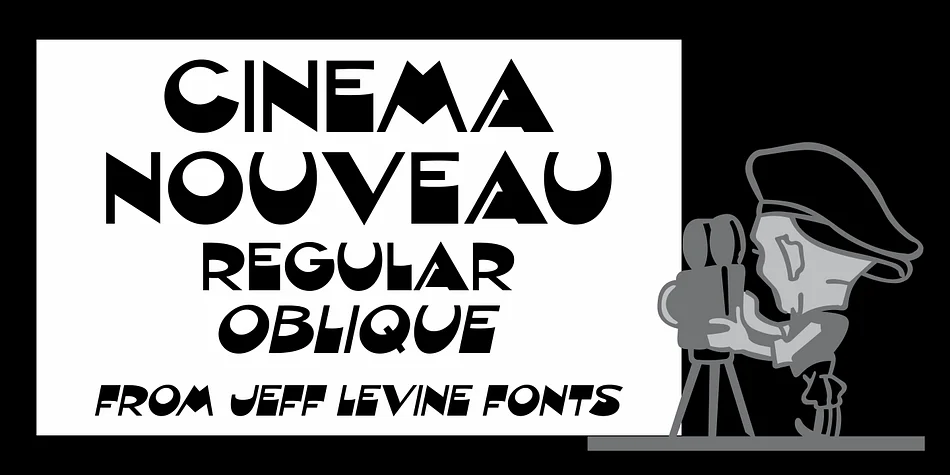
Cinema Nouveau JNL pulls from the elegant, flowing lines of hand-lettered Art Nouveau, directly inspired by the masthead typography of Shadowland, a magazine celebrating the arts in the 1920s. Jeff Levine Fonts crafted this decorative typeface to capture that theatrical finesse and ornamental sophistication, translating early twentieth-century aesthetics into a working font for contemporary designers tackling period-specific projects.
Use it for luxury cosmetics packaging where a touch of vintage elegance makes all the difference, or for hand-calligraphed wedding invitation suites that genuinely need strong visual character and presence. Boutique wine labels, art deco-inspired perfume boxes, retro cinema promotional materials, and upscale restaurant menus all benefit from its ornamental strength and visual gravitas. The letterforms have real substance without feeling heavy or overdone, striking that careful balance between decorative personality and genuine readability across different sizes. You get regular and oblique versions, giving you flexibility to adjust angles for layout emphasis or directional flow without sacrificing the typeface's core character.
This works best for designers building high-end brand identities rooted in vintage visual language, or anyone working on projects where Art Nouveau sensibility is absolutely core to the concept. Head over to Creative Fabrica to add Cinema Nouveau JNL to your collection.
Style & Use Cases
- Overall Style
- Bold, Distinctive
- Use Case
- Headlines, Posters
- Ideal For
- logos, packaging, and standout titles
- Pairs With
- a neutral sans-serif
How to Install CINEMA NOUVEAU JNL Font
Step-by-step instructions for every platform
- 1Download the CINEMA NOUVEAU JNL font file (.ttf or .otf).
- 2Locate the downloaded file in your Downloads folder.
- 3Right-click the font file.
- 4Select "Install" to install for the current user, or "Install for all users" to make it available system-wide.
- 5CINEMA NOUVEAU JNL is now available in Word, Photoshop, Illustrator, and all other apps.
More by Jeff Levine Fonts
View all →



Browse fonts by theme
Curated collections →Saw a font in a picture? Identify any font from an image with our free Font Finder.
More Decorative Fonts
Browse all →







What pairs well with CINEMA NOUVEAU JNL Font?
CINEMA NOUVEAU JNL Font is a decorative font that shines as a display or heading face. Pair it with a clean sans-serif or serif font for body text — the contrast creates a clear hierarchy while the two styles stay balanced and easy to read.




CINEMA NOUVEAU JNL Font
Reviewed by the FontBoxDL team · Updated June 2026