
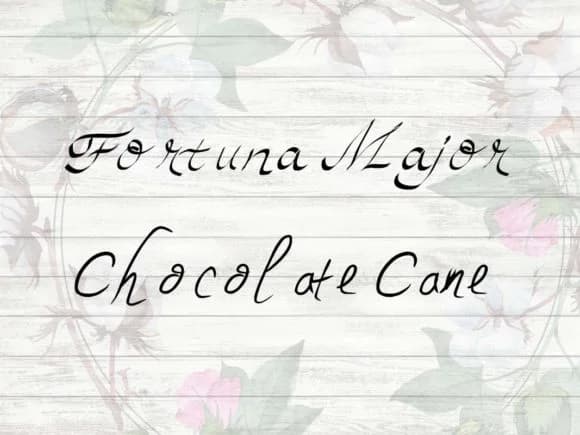
About Chocolate Cane Duo Font
You're designing holiday gift labels, and you need a typeface that balances refinement with festive warmth. Chocolate Cane Duo, from craftynerdco, delivers that balance with two complementary script-handwritten styles ready to work together. This pairing approach gives you genuine flexibility when designing winter wedding invitation suites, seasonal product packaging, festive menu cards, and luxury chocolate packaging. Rather than hunting for a secondary font when you need visual variation, you have two cohesive styles built as an intentional set.
The real advantage is that both styles create interest while staying visually unified. Use one as your primary text voice and the other for headlines, or layer them for extra richness on packaging labels and greeting cards. These letterforms read clearly at large sizes, where the handcrafted quality becomes fully visible. Artisan bakery boxes, boutique gift stationery, upscale event menus, and DIY craft signs all work beautifully with this dual approach.
Having two related styles gives you the flexibility to establish visual hierarchy and guide the viewer's eye while keeping that cohesive, handcrafted warmth that script fonts bring to premium designs. Both styles come with your Creative Fabrica subscription and are ready to use across all your projects.
Style & Use Cases
- Overall Style
- Elegant, Flowing, Chocolate Cane
- Use Case
- Invitations, Branding
- Ideal For
- wedding stationery, greeting cards, and signatures
- Pairs With
- a simple uppercase sans
How to Install Chocolate Cane Duo Font Font
Step-by-step instructions for every platform
- 1Download the Chocolate Cane Duo Font font file (.ttf or .otf).
- 2Locate the downloaded file in your Downloads folder.
- 3Right-click the font file.
- 4Select "Install" to install for the current user, or "Install for all users" to make it available system-wide.
- 5Chocolate Cane Duo Font is now available in Word, Photoshop, Illustrator, and all other apps.
More Script Handwritten Fonts
Browse all →







What pairs well with Chocolate Cane Duo Font?
Chocolate Cane Duo Font is a script font that shines as a display or heading face. Pair it with a clean sans-serif or serif font for body text — the contrast creates a clear hierarchy while the two styles stay balanced and easy to read.



Chocolate Cane Duo Font
by craftynerdco
Reviewed by the FontBoxDL team · Updated May 2026