 Firefox
 1 / 8
1 / 8About Cat Posting Tree Font
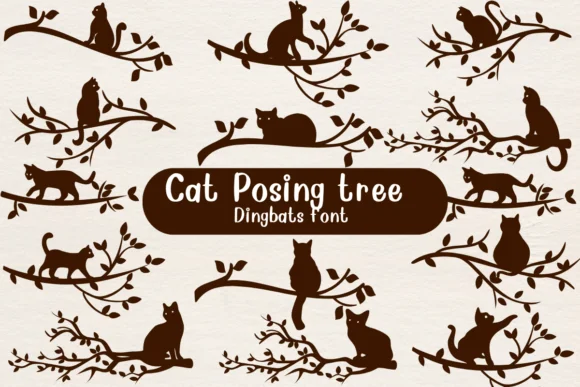
This collection radiates a charming, illustrative quality that brings whimsy into otherwise minimal layouts. Cat Posting Tree, crafted by Nongyao, is a dingbat typeface built entirely from delicate silhouettes of cats perched among branches and foliage. Each character functions as a complete small illustration ready to integrate into your creative work, and these pieces bring personality and a touch of the artistic to projects that might otherwise feel sparse or impersonal.
Where do these silhouettes work best? Think custom greeting card suites with an animal theme, autumn-themed nursery wall prints, illustrated children's book margins, pet brand social media templates, or DIY craft wall stickers. The outline construction means each glyph reads beautifully as a standalone element or combines with color for dimensional depth. That flexibility makes it invaluable for sticker design sheets, scrapbook embellishments, illustrated product labels, and any project where drawing carries more weight than letterform. You get ready-made illustration without the time or cost of commissioning custom artwork.
Pair it with a clean, simple sans-serif whenever you need body text alongside these images, letting the dingbats hold primary attention. Creative Fabrica stocks this one and it's ready to download for your next project.
Style & Use Cases
- Overall Style
- Iconographic, Fonts
- Use Case
- Icons, Accents
- Ideal For
- ornaments, bullets, and decorative flourishes
- Pairs With
- any text font
How to Install Cat Posting Tree Font
Step-by-step instructions for every platform
- 1Download the Cat Posting Tree font file (.ttf or .otf).
- 2Locate the downloaded file in your Downloads folder.
- 3Right-click the font file.
- 4Select "Install" to install for the current user, or "Install for all users" to make it available system-wide.
- 5Cat Posting Tree is now available in Word, Photoshop, Illustrator, and all other apps.




Browse fonts by theme
Curated collections →Saw a font in a picture? Identify any font from an image with our free Font Finder.
More Dingbats Fonts
Browse all →







What pairs well with Cat Posting Tree Font?
Cat Posting Tree Font is a versatile dingbats font that works for both headings and body text. Pair it with a contrasting sans-serif or serif font to add visual interest and a clear distinction between titles and body copy.




Cat Posting Tree Font
by Nongyao
Reviewed by the FontBoxDL team · Updated July 2026