 Firefox
 1 / 3
1 / 3About Castle Fleurons Font
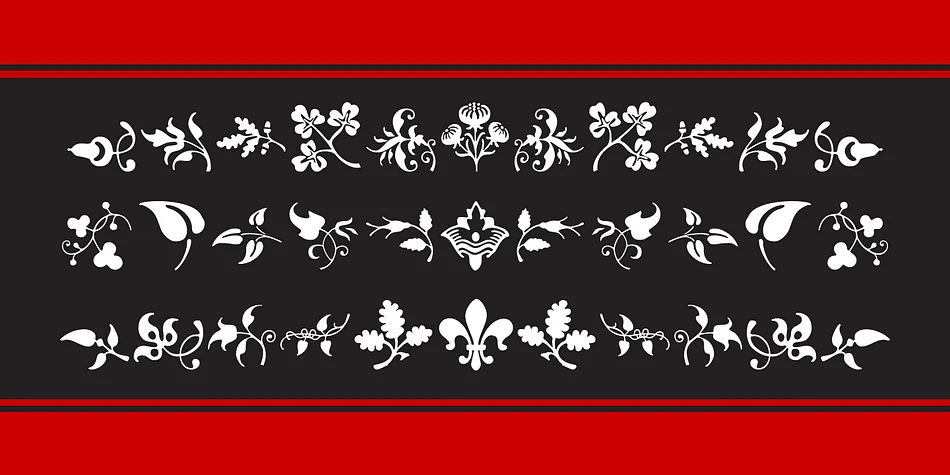
This font evokes elegance and historical depth, the kind of ornamental precision you'd find in centuries-old typography. Castle Fleurons by CastleType offers more than 200 individual marks, each thoughtfully drawn from classical design traditions. The collection gives you mirrored pairs (left and right facing versions) so borders and dividers read as intentional and balanced. Some marks rotate on all four axes, letting you build intricate tiling patterns or corner flourishes without ever repeating the exact same orientation. Full Unicode support plus keyboard mapping ensures these ornaments remain accessible across applications, from older software to the latest design tools.
Wedding invitation suites benefit enormously from these ornamental accents as dividers or frame elements. Letterpress projects gain real sophistication from marks that feel rooted in classical stationery. Scrapbooking layouts and handmade greeting cards have a natural home for these flourishes. Even book designers still reach for classical fleuron marks to separate chapters, add visual rhythm, and guide readers through a page with intention.
Pair Castle Fleurons with a restrained serif or clean sans-serif for body text, letting these ornaments do the decorative work. Get it from Creative Fabrica and start layering these marks into designs that feel genuinely thoughtful.
Style & Use Cases
- Overall Style
- Iconographic
- Use Case
- Icons, Accents
- Ideal For
- ornaments, bullets, and decorative flourishes
- Pairs With
- any text font
How to Install Castle Fleurons Font
Step-by-step instructions for every platform
- 1Download the Castle Fleurons font file (.ttf or .otf).
- 2Locate the downloaded file in your Downloads folder.
- 3Right-click the font file.
- 4Select "Install" to install for the current user, or "Install for all users" to make it available system-wide.
- 5Castle Fleurons is now available in Word, Photoshop, Illustrator, and all other apps.
More by CastleType
View all →

Browse fonts by theme
Curated collections →Saw a font in a picture? Identify any font from an image with our free Font Finder.
More Dingbats Fonts
Browse all →







What pairs well with Castle Fleurons Font?
Castle Fleurons Font is a versatile dingbats font that works for both headings and body text. Pair it with a contrasting sans-serif or serif font to add visual interest and a clear distinction between titles and body copy.




Castle Fleurons Font
by CastleType
Reviewed by the FontBoxDL team · Updated August 2026