 Firefox
 1 / 8
1 / 8About Camera Icon Collection Font
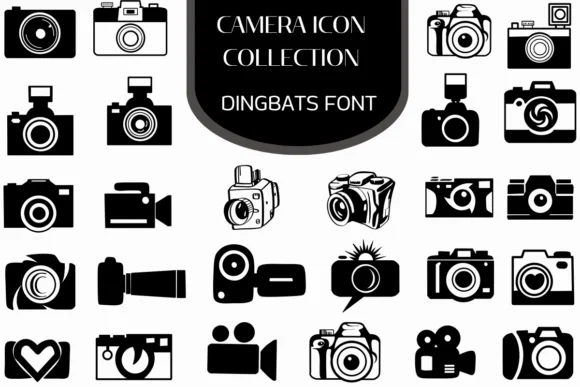
You're designing a photography portfolio website or building icon sets for a camera app. Camera Icon Collection by Heartcraft Atelier is exactly what you reach for when you need symbols that actually look like they belong in your design. This dingbats font delivers a complete visual vocabulary of photography symbols, each one genuinely thoughtful instead of generic stock imagery.
The collection spans from film cameras and vintage models to modern DSLRs, mirrorless bodies, camcorders, and playful heart-shaped lenses. External flashes, lens flare details, and varied body silhouettes round out the set, all rendered in clean, high-contrast black and white that reads crisply at any size from tiny to massive. Everything you need is in one place, no hunting through separate icon packs. This font shines for photography tutorial infographics, boutique camera retailer product pages, Instagram Stories templates for photographers, and photography blog headers. Both OTF and TTF formats are included, so you're covered in Procreate, Affinity Designer, Affinity Photo, or your preferred design software.
The consistent weight and clean rendering mean these icons work equally well as tiny interface elements or large decorative focal points. You can scale them up dramatically without losing clarity, and the high-contrast style makes them pop against any background color. Grab it from Creative Fabrica to get the complete collection into your design toolkit.
Style & Use Cases
- Overall Style
- Iconographic, Fonts
- Use Case
- Icons, Accents
- Ideal For
- ornaments, bullets, and decorative flourishes
- Pairs With
- any text font
How to Install Camera Icon Collection Font
Step-by-step instructions for every platform
- 1Download the Camera Icon Collection font file (.ttf or .otf).
- 2Locate the downloaded file in your Downloads folder.
- 3Right-click the font file.
- 4Select "Install" to install for the current user, or "Install for all users" to make it available system-wide.
- 5Camera Icon Collection is now available in Word, Photoshop, Illustrator, and all other apps.
More by Heartcraft Atelier
View all →



Browse fonts by theme
Curated collections →Saw a font in a picture? Identify any font from an image with our free Font Finder.
More Dingbats Fonts
Browse all →







What pairs well with Camera Icon Collection Font?
Camera Icon Collection Font is a versatile dingbats font that works for both headings and body text. Pair it with a contrasting sans-serif or serif font to add visual interest and a clear distinction between titles and body copy.




Camera Icon Collection Font
Reviewed by the FontBoxDL team · Updated June 2026