 Firefox
 1 / 8
1 / 8Loading font…
About Camera Font
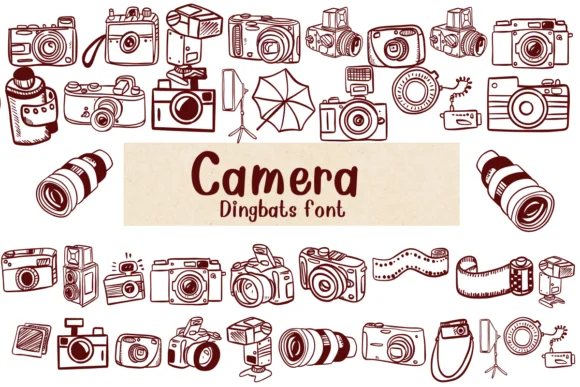
This font captures that nostalgic appeal of vintage photography without being heavy-handed about it. Camera, designed by Nongyao, is a dingbat typeface where each letter transforms into a different camera design. The collection spans from classic film cameras to boxy, colorful viewfinders, all rendered with that satisfying hand-drawn quality that makes dingbats feel like they were sketched rather than engineered from scratch.
The real strength here is how versatile it actually is. Photography portfolio covers benefit enormously from having these iconic shapes alongside text, breaking up the layout visually. Travel scrapbooking layouts gain instant character when you swap in a camera dingbat for emphasis or section breaks. Vintage camera shop signage or photography business cards get natural personality with these designs, and they work equally well for camera-themed wedding invitations if you're going retro with your stationery. The designs stay legible across different sizes, which matters when you're working between social media graphics and physical print. Both OTF and TTF formats are included, making integration smooth with Procreate, Affinity Designer, Affinity Photo, or any other creative software you rely on.
Pair this with a clean, minimal sans-serif for body text, and the camera designs become your visual anchor. Find it on Creative Fabrica and give your next project some playful vintage presence.
Style & Use Cases
- Overall Style
- Iconographic, Fonts
- Use Case
- Icons, Accents
- Ideal For
- ornaments, bullets, and decorative flourishes
- Pairs With
- any text font
How to Install Camera Font
Step-by-step instructions for every platform
- 1Download the Camera font file (.ttf or .otf).
- 2Locate the downloaded file in your Downloads folder.
- 3Right-click the font file.
- 4Select "Install" to install for the current user, or "Install for all users" to make it available system-wide.
- 5Camera is now available in Word, Photoshop, Illustrator, and all other apps.




Browse fonts by theme
Curated collections →Saw a font in a picture? Identify any font from an image with our free Font Finder.
More Dingbats Fonts
Browse all →







What pairs well with Camera Font?
Camera Font is a versatile dingbats font that works for both headings and body text. Pair it with a contrasting sans-serif or serif font to add visual interest and a clear distinction between titles and body copy.




Camera Font
by Nongyao
Reviewed by the FontBoxDL team · Updated October 2026