
 1 / 9
1 / 9About Butter Font
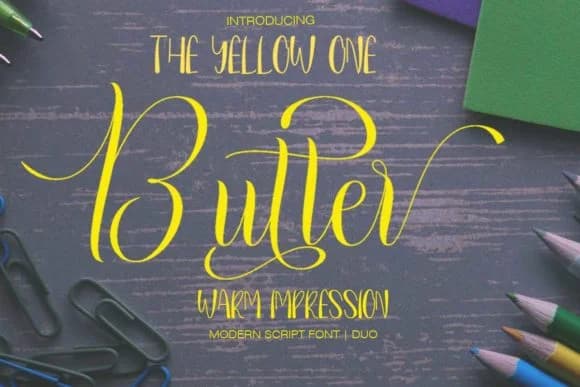
Warm, indulgent, and genuinely approachable. Butter Font by petterco.font is a two-part system pairing a flowing script with a clean sans-serif, designed to work together or stand alone. The script version has that hand-drawn, brushed quality that doesn't sacrifice readability, so letters connect naturally without feeling forced or artificial. The sans complement keeps things grounded and practical, giving you real flexibility in how you build a layout.
This pairing works beautifully across luxury beauty packaging, elegant wedding invitation suites, boutique coffee shop menus, and artisanal food labels. The script carries warmth and personality, while the sans handles the functional text with confidence. You get enough character to feel distinctive without veering into territory that feels precious or overwrought. Having both versions means you're not locked into one voice: use the script for headlines and impact, lean on the sans for body copy and details.
If you want a more restrained aesthetic, pair Butter's script with a classic serif to create sophisticated contrast. The combination balances warmth with formality. Grab Butter Font on Creative Fabrica and experiment with how both the script and sans work in your designs.
How to Install Butter Font Font
Step-by-step instructions for every platform
- 1Download the Butter Font font file (.ttf or .otf).
- 2Locate the downloaded file in your Downloads folder.
- 3Right-click the font file.
- 4Select "Install" to install for the current user, or "Install for all users" to make it available system-wide.
- 5Butter Font is now available in Word, Photoshop, Illustrator, and all other apps.
More by petterco.font
View all →
More Script Handwritten Fonts
Browse all →







What pairs well with Butter Font?
Butter Font is a script font that shines as a display or heading face. Pair it with a clean sans-serif or serif font for body text — the contrast creates a clear hierarchy while the two styles stay balanced and easy to read.


Butter Font
Reviewed by the FontBoxDL team · Updated June 2026