 Firefox
 1 / 8
1 / 8About Bunny Easter Doodles Font
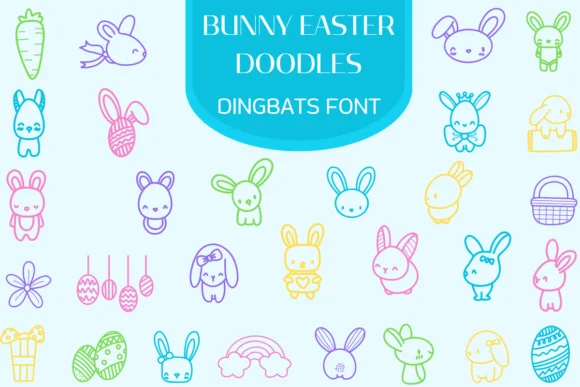
You're assembling an Easter collection for your local bakery's packaging, and you need bunny illustrations that feel both handcrafted and professionally polished. Bunny Easter Doodles by Heartcraft Atelier is a dingbats font loaded with bunny characters, spring eggs, carrots, and playful seasonal details that nail exactly what you're after. The icons come across as cohesive and modern while retaining that warm, approachable personality.
This font excels for Easter greeting card designs, children's party invitations, DIY craft bunting projects, and artisanal food packaging labels where having quick access to thematic illustrations matters. The monolinear rendering means each doodle reads crisply whether you're using it small or scaling it way up. Instead of hunting through image libraries or drawing your own doodles, you simply type the character and the icon appears. Because each glyph is crafted as a standalone illustration, you can compose them freely across layouts, mix them between text, or stack them as decorative elements without relying on extra software.
Every illustration here scales cleanly from small print sizes to large signage without losing character. Find Bunny Easter Doodles on Creative Fabrica when you're ready to start your seasonal projects.
Style & Use Cases
- Overall Style
- Iconographic, Fonts
- Use Case
- Icons, Accents
- Ideal For
- ornaments, bullets, and decorative flourishes
- Pairs With
- any text font
How to Install Bunny Easter Doodles Font
Step-by-step instructions for every platform
- 1Download the Bunny Easter Doodles font file (.ttf or .otf).
- 2Locate the downloaded file in your Downloads folder.
- 3Right-click the font file.
- 4Select "Install" to install for the current user, or "Install for all users" to make it available system-wide.
- 5Bunny Easter Doodles is now available in Word, Photoshop, Illustrator, and all other apps.
More by Heartcraft Atelier
View all →



Browse fonts by theme
Curated collections →Saw a font in a picture? Identify any font from an image with our free Font Finder.
More Dingbats Fonts
Browse all →







What pairs well with Bunny Easter Doodles Font?
Bunny Easter Doodles Font is a versatile dingbats font that works for both headings and body text. Pair it with a contrasting sans-serif or serif font to add visual interest and a clear distinction between titles and body copy.




Bunny Easter Doodles Font
Reviewed by the FontBoxDL team · Updated June 2026