 Firefox
 1 / 8
1 / 8About Bunny Doodle Font
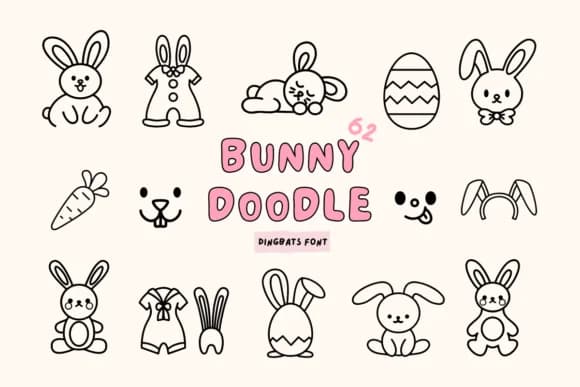
This typeface sparkles with childlike wonder and playful charm. Bunny Doodle, created by Babymimiart, is a dingbats font that brings illustrated personality to designs for kids and family-friendly brands.
What makes it work for so many projects is its versatility with specific audiences. Use it for classroom bulletin board headers and school newsletter graphics. Birthday invitation suite designs benefit from its illustrated quality. Children's book covers and interior chapter markers gain visual interest. Toy packaging and children's product labels jump off the shelf with this character-driven approach. The font's collection of forms and symbols offers plenty to play with, meaning your designs won't feel confined to the same repeated marks.
The rounded, bold weight works across scales. Size it large on party banners and event posters for instant visual punch, or small on stickers, teacher reward badges, and scrapbook embellishments where details stay crisp. Combine Bunny Doodle with a straightforward sans-serif like Poppins for body text and structure, letting the dingbats steal focus where they belong. Get it from Creative Fabrica and start building designs that speak to younger eyes.
Style & Use Cases
- Overall Style
- Iconographic, School Fonts
- Use Case
- Icons, Accents
- Ideal For
- ornaments, bullets, and decorative flourishes
- Pairs With
- any text font
How to Install Bunny Doodle Font
Step-by-step instructions for every platform
- 1Download the Bunny Doodle font file (.ttf or .otf).
- 2Locate the downloaded file in your Downloads folder.
- 3Right-click the font file.
- 4Select "Install" to install for the current user, or "Install for all users" to make it available system-wide.
- 5Bunny Doodle is now available in Word, Photoshop, Illustrator, and all other apps.
More by Babymimiart
View all →

Browse fonts by theme
Curated collections →Saw a font in a picture? Identify any font from an image with our free Font Finder.
More Dingbats Fonts
Browse all →







What pairs well with Bunny Doodle Font?
Bunny Doodle Font is a versatile dingbats font that works for both headings and body text. Pair it with a contrasting sans-serif or serif font to add visual interest and a clear distinction between titles and body copy.



Bunny Doodle Font
by Babymimiart
Reviewed by the FontBoxDL team · Updated July 2026