 Firefox
 1 / 8
1 / 8About Notebook Doodle Font
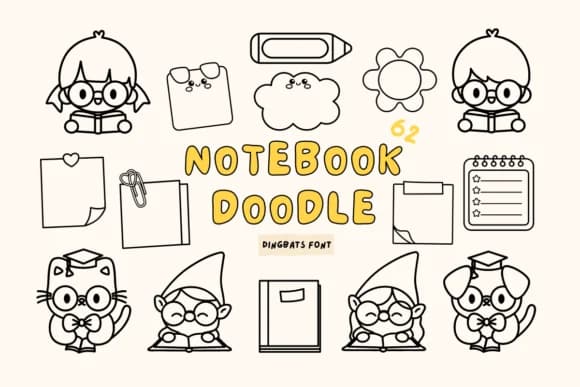
You're decorating your bullet journal spread and need ornaments that feel genuinely hand-drawn. Notebook Doodle from Babymimiart is a dingbat font packed with charming sketched symbols that bring playful personality to your pages. The collection includes quirky decorative frames, whimsical character marks, and ornamental doodles perfect for bullet journal spreads, planner cover designs, DIY sticker sheet layouts, and scrapbook page embellishments.
This font excels at margin doodles and corner decorations that don't feel like generic clipart. It works beautifully in greeting card embellishments, handwritten journal decorations, and digital planner designs where sketch-like quality matters most. The symbols read equally well whether you're building a spread on paper or designing templates for digital screens. Unlike standard ornament fonts, these marks feel personal and organic without requiring you to actually draw anything.
The outline design keeps every doodle readable at any size, which matters when you're combining these marks with handwriting or other text elements. Color layering is straightforward if you want to add visual depth to your designs, and the full range of marks means you can mix and match freely across multiple pages without repetition. Grab Notebook Doodle on Creative Fabrica and transform those blank planner pages into something you'll genuinely enjoy using.
Style & Use Cases
- Overall Style
- Iconographic, Notebook Fonts
- Use Case
- Icons, Accents
- Ideal For
- ornaments, bullets, and decorative flourishes
- Pairs With
- any text font
How to Install Notebook Doodle Font
Step-by-step instructions for every platform
- 1Download the Notebook Doodle font file (.ttf or .otf).
- 2Locate the downloaded file in your Downloads folder.
- 3Right-click the font file.
- 4Select "Install" to install for the current user, or "Install for all users" to make it available system-wide.
- 5Notebook Doodle is now available in Word, Photoshop, Illustrator, and all other apps.
More by Babymimiart
View all →

Browse fonts by theme
Curated collections →Saw a font in a picture? Identify any font from an image with our free Font Finder.
More Dingbats Fonts
Browse all →







What pairs well with Notebook Doodle Font?
Notebook Doodle Font is a versatile dingbats font that works for both headings and body text. Pair it with a contrasting sans-serif or serif font to add visual interest and a clear distinction between titles and body copy.



Notebook Doodle Font
by Babymimiart
Reviewed by the FontBoxDL team · Updated June 2026